My Prayers Answered: Flux-architecture and Zustand
In my last blog post I lamented over React’s prop drilling problem and how React Router did not fix or help the problem whatsoever.
But turns out, no!
I AM SO GLAD THAT FLUX-ARCHITECTURE IS A THING.
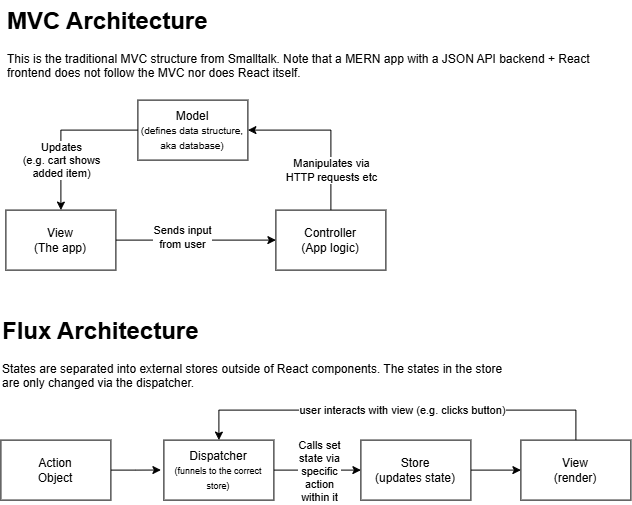
Flux Architecture
In Flux, states are separated entirely from the React components. They’re like global variables (but are read-only) in the sense that they live completely separate from everything, and components subscribe to the store and pull a copy of the state for rendering.
Basically, three principles in Flux architecture:
- Separation: states must live outside of the component tree
- Read-only access: Components cannot mutate the state directly
- Subscription-based sync: Components pull their own copy after being notified, instead of multiple components reading the same shared memory live
Flux provides a standard way for how and where the application state is kept and for making changes to it. This avoids race conditions, as all writes are serialised through the Dispatcher, one at a time. This stops two updates from being interleaved with each other, a race condition MVC is prone to.
Other than forcing state changes into a serial queue system, Flux also tidies up React programs, as states don’t need to be passed down through props anymore, as individual components can import (subscribe) to stores independently.
Zustand
FSO introduces Zustand, a Flux-like alternative to Flux. It’s gaining popularity for its ease of use, Flux and Redux have a lot of boilerplate code, while Zustand simply cuts down everything down to just the store and view:
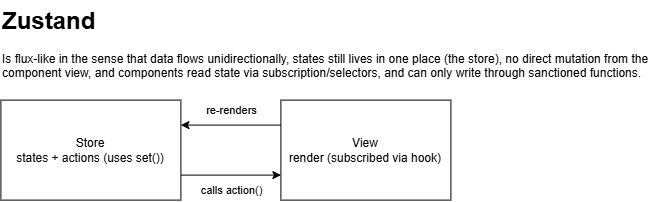
A Zustand store is created with their create function:
import { create } from 'zustand'

const useCounterStore = create(set => ({
  counter: 0,
  actions: {
    increment: () => set(state => ({ counter: state.counter + 1 })),
    decrement: () => set(state => ({ counter: state.counter - 1 })),
    zero: () => set(() => ({ counter: 0 })),
  }
}))
The create function returns a custom hook that acts as a store.
All of these are custom React hooks.
But what is a hook?
Hooks are functions that give you access to React’s internal memory (the states and the page re-rendering mechanism). Hooks should only be called from React functional components or other hooks, but not inside loops, conditional statements, or nested functions (e.g. as a callback function). They assume that they can call all the regular React APIs (useState etc…)
By convention, hook function names should start with the word ‘use’, this tells the reader (and linters) that the function is a hook.
Essentially, a hook is a function wrapping around other React hooks (be it custom hooks or built-in React hooks like useState), and follows the Rules of Hooks.
Anyway, back to Zustand.
Zustand Selectors
For easy access to the states, they can be exported with selectors like so:
export const useCounter = () => useCounterStore(state => state.counter)
export const useCounterControls = () => useCounterStore(state => state.actions)
I found selectors odd looking because, well, where does this state variable come from? But turns out it’s that internally, it’s a parameter that Zustand expects when it calls the selector function (similar to Node Express expecting the multiple arguments req, res, next in the function supplied when the .get method is used)
Internally, useCounterStore is something like this:
function useCounterStore(selector) {
  const currentState = getInternalState() // get what's in the store now
  return selector(currentState) // Zustand calls the selector function, passing in the current state
}
state => state.counter is an arrow function with one parameter, and Zustand calls it, passing in the actual store object as the argument.
This means that state in the selector function passed in by Zustand is a current snapshot of the whole store object that was initially created with create. We can safely access the object and only return what we need with the selector function.
Which is better than destructuring:
const { count } = useCounterStore()
Because if there’s another state within useCounterStore() that updates, it will also trigger a re-render for any component using count,
A note about Zustand:
Like React’s useState, we need to update state immutably (e.g. arrays are concated, not pushed)
The action functions that modify the state must be pure functions (does not cause any side effects and always returns the same result when called with the same parameters)
Form Submission Methods
Uncontrolled forms
Uncontrolled forms are forms that do not use a state to hold values for each input. This is traditional oldschool javascript form behaviour.
const NoteForm = () => {
  const addNote = (e) => {
    e.preventDefault()
    const content = e.target.note.value
    console.log(content)
    e.target.reset()
  }


  return (
    <form onSubmit={addNote}>
      <input name="note" />
      <button type="submit">add</button>
    </form>
  )
}
e.target.note.value works because the <input name="note"> becomes directly accessible as a named property on the form element (e.target is the <form>, and .note finds the input by its name attribute)
Controlled forms
States are used to keep track of each input.
const NoteForm = () => {
  const [note, setNote] = useState('')


  const addNote = (e) => {
    e.preventDefault()
    const content = note
    console.log(content)
    setNote('')
  }


  return (
    <form onSubmit={addNote}>
      <input value={note} onChange={e => setNote(e.target.value)} />
      <button type="submit">add</button>
    </form>
  )
}
Controlled forms can provide validation on the fly, uncontrolled forms are much more primitive.Though, the trade off for controlled forms is that every keystroke triggers a re-render of the component, increasing CPU usage.
| Previous Post | Next Post |