Testing React Apps with Vitest and Playwright
In part 5C of FSO, we test our React app with testing tools from Vitest, jsdom and react-testing-library. But what are these tools exactly?
- Vitest: A testing library (the framework that defines the
describe,expect,beforeEach, the validations etc) - react-testing-library: The library that renders React components onto a DOM (but you need to supply it with one) so it can be used for tests. It also provides methods to get individual parts of the components (e.g.
screen.getByText('text here')) - jsdom: A library used to simulate a web browser, used as a test environment. This way react-testing-library has something to render onto.
Why is jsdom a thing?
As I’ve talked about before much earlier, Node.js is a Javascript runtime environment that lets users run Javascript directly in their shell, bypassing the need of a browser. Javascript was a language created just for browsers to read and execute, so there are objects and methods directly pertaining to browsers and websites.
This is how it works:
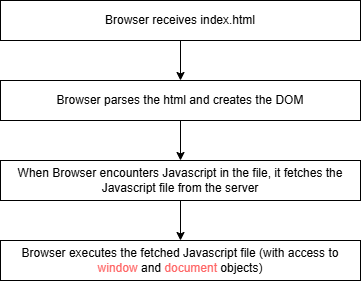
This means that executing document in Node will return an error as there is no DOM, there is no browser instance.
jsdom simulates the browser by creating an empty DOM. It’s a Javascript library that builds an in-memory data structure (a tree of Javascript objects) mimicking the DOM API. It doesn’t actually render anything graphically (so calling getBoundingClientRect() returns zero/mock values)
For our React app, Vite takes our React source files (JSX, imports etc) and then bundles and transpiles them into javascript that the browser will eventually fetch. And it is under Vite where the jsdom environment configuration lies.
export default defineConfig({
  plugins: [react()],
  test: {
    environment: 'jsdom',
  },
})
Vitest is built on top of Vite, so when Vitest is run, it looks to the same Vite config file that Vite uses and reads the properties under test. Vitest runs inside of Node itself, so it calls jsdom to simulate the web browser and return its simulated DOM for testing (the environment).
When running the real app (with vite or vite dev), the environment is the browser itself. Node is only used to act as a server, listening to the browser and serving the pages/files.
End to End testing (or System testing)
End-to-end (E2E) testing is testing done on a whole software system. Think of mimicking what an actual user does on your final product. In FSO, we use headless browsers (browsers with no graphical user interfaces), such as Playwright. Another popular library is Cypress and Selenium.
Both are very different, as Cypress tests are run within the browser, but Playwright’s tests are executed within the Node process, which is connected to the browser via programming interfaces.
Playwright is created in a completely separate folder from our frontend and backend, it can run on its own. It is installed by running the new project directory with the command:
npm init playwright@latest
Playwright comes with its own config file, which you can adjust to your needs:
export default defineConfig({
  // ...

  timeout: 3000, // time in ms before test times out and fails
  fullyParallel: false, // means that tests will be executed one at a time
  workers: 1,
  // ...
})
Here is an example of how Playwright tests look:
describe('Note app', () => {
  // ...

  test('user can log in', async ({ page }) => {
    await page.goto('http://localhost:5173')

    await page.getByRole('button', { name: 'login' }).click()

    await page.getByLabel('username').fill('mluukkai')
    await page.getByLabel('password').fill('salainen')

    await page.getByRole('button', { name: 'login' }).click()

    await expect(page.getByText('Matti Luukkainen logged in')).toBeVisible()
  })
})
You can run the tests in UI mode as well, with:
npm test -- --ui
Note: Playwright doesn’t work on VS Codespaces out of the box (it runs into an xserver error), see this. TLDR run this:
npx playwright test --ui-port=8080 --ui-host=0.0.0.0
What’s the difference between jsdom and headless browsers like Playwright?
| jsdom | Headless browsers |
|---|---|
| Is a pure javascript implementation of DOM APIs | Is an actual browser engine but without a visible UI window |
| Has no rendering engine, no layout no CSS computation | Has a real rendering engine, real layout/CSS engine, real Javascript engine, real network stack |
Headless browsers are like a browser with an automated robot navigating your web app. I’m pretty sure they are also what’s used for web scraping and concert ticket scalping robots when the site requires heavy Javascript rendering and direct HTTP requests aren’t enough.
Debugging modes
There are two debugging modes for Playwright.
- Debug mode (with
--debugflag): Shows the progress of tests with a step-by-step debugger. - Trace viewer (with
--trace on): Shows a ‘visual trace’ of the tests saved, which can be viewed after the tests are done. Offers the possibility of assisted search for locators.
Playwright has high quality documentation. Worth checking out.
| Previous Post | Next Post |