User Authorization and JSON Web Tokens
Part 4D of FSO talks about user authorization. The earlier part (and my earlier blog post) was about user authentication.
- Authentication: Verifying who the user is (via logging in, etc)
- Authorization: Verifying what the user has access to
JSON Web Token (JWT)
A form of token-based authentication. Illustrated by the image below by the staff behind FSO:
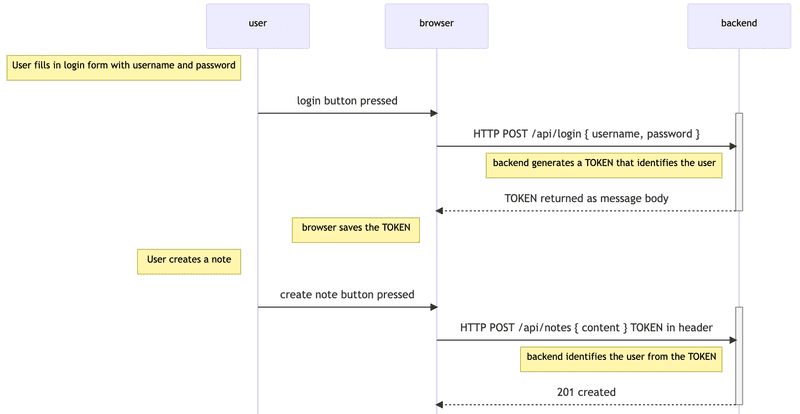
A way to transmit information between two parties as a JSON object. It is digitally signed using a secret (with the HMAC algorithm) or a public/private key pair using RSA or ECDSA. It consists of a header, payload and signature. The header specifies the signing algorithm and the type of token. The payload is the data to be transmitted. The signature is created by taking the encoded header (with the algo specified in the header), encoded payload and secret through a hash algorithm (if using HMAC).
The node jsonwebtoken library makes it all very easy with a simple:
jwt.sign((payload), (secret))
and
jwt.verify((token),(secret))
Remember that JWTs are encoded, not encrypted. As the payload and headers can be reversed by anyone. The secret only creates the signature, to prove authenticity/lack of tampering.
Session-based authentication
There are multiple ways to implement user authorization in a full stack web application. The one FSO covers is known as token-based authentication. However there’s another method is called session-based authentication (or server-side/cookie-based authentication).
This was what was used in CS50X’s Flask part of the course, I remember as much.
It was configured using sessions on Flask like so:
from flask import session
from flask_session import Session

# Configure session to use filesystem (instead of signed cookies)
app.config["SESSION_PERMANENT"] = False
app.config["SESSION_TYPE"] = "filesystem"
Session(app)
(Not going to get too deep into Flask here but) Session(app) is the line that takes the Flask app object and initializes Flask-Session on it, using the config values set earlier.
Then on login:
# Forget any user_id
session.clear()
# .
# ...Other code here...
# .
# Remember which user has logged in
session["user_id"] = rows[0]["id"]
session["username"] = request.form.get("username")
So the flow looks like this:
- User visits site and logs in, the data in lines
session["user_id"] = rows[0]["id"]andsession["username"] = request.form.get("username")gets saved into the session - Flask-Session writes the file containing that data with a random session ID into our local filesystem (as per
app.config["SESSION_TYPE"] = "filesystem") - The browser receives a cookie only containing that random session ID
- On the next request, the browser sends that cookie back
- Flask-Session finds the file matching the session ID given by the cookie and loads the data into the
sessionobject
HTTPS over HTTP
Usernames, passwords and applications using token authentication must always be used over HTTPS. As basic authentication involves sending the data to the server in plaintext over HTTP can be intercepted and accessed.
| Previous Post | Next Post |