CORS and Deploying with Render
Browsers and CORS
For security reasons, browsers have a Same Origin Policy.
Same Origin Policy (SOP): Scripts from one origin cannot modify other origins.
What constitutes the same origin: If their protocol (http vs https), their host (URL) and port is the same.
This is to stop websites from reading or modifying other websites maliciously (DOM access, response content of fetch/XHR, localStorage etc). Some things are allowed cross-origin, but restricted:
Cross-origin image,script or iframe (but reading its content is not allowed)
Sending cross-origin form submissions or ‘simple’ fetch requests, but you can’t read the response without CORS headers allowing it.
Also, this means that a single origin could modify the DOM of another tab if the origin has reference to the tab’s window object and is of the same origin (e.g. Tab A opens Tab B via window.open() or iframes)
Cross-Origin Resource Sharing (CORS) is a mechanism that helps allow origins to request data from other origins. Basically the server receiving the request needs to have their Access-Control-Allow-Origin header to explicitly allow the origin to make requests (or use a wildcard * to allow any origin to make the request). If there’s a mismatch, the browser errors.
It’s important to note that it’s the browser that blocks reading the response, and it’s the server that tells the browser if a request from an origin is allowed.
Browsers also preflight requests. For ‘non-simple’ requests (PUT/DELETE, custom headers, json content etc), the browser sends an OPTIONS request to check permissions via Access-Control-Allow-Methods and Access-Control-Allow-Headers before sending the actual request.
The wildcard * doesn’t work with credentials. If the request includes cookies or Authorization headers, & is rejected by the browser. The server MUST specify an exact origin and set Access-Control-Allow-Credentials to true.
Deploying to the Internet with Render
With Render, I began my very first exposure to hosting a full stack web app on the internet.
Render is a Platform-as-a-Service (PaaS) provider. Basically, we can deploy our web apps to the service and it takes care of the deployment, scaling, SSL certificates, OS, middleware, databases and other services to host our application.
In cloud computing (Which is basically on demand rental IT resources and computing services, like servers, storage, databases, over the internet. Pay as you go services), there are four services:
- Infrastructure-as-a-Service (IaaS)
- Containers-as-a-Service (CaaS)
- Platform-as-a-Service (PaaS)
- Software-as-a-Service (SaaS)
It’s a lot and a lot to cover, a really useful resource that goes through all of them is this article from Google Cloud.
This image from the article summarises each service pretty well:
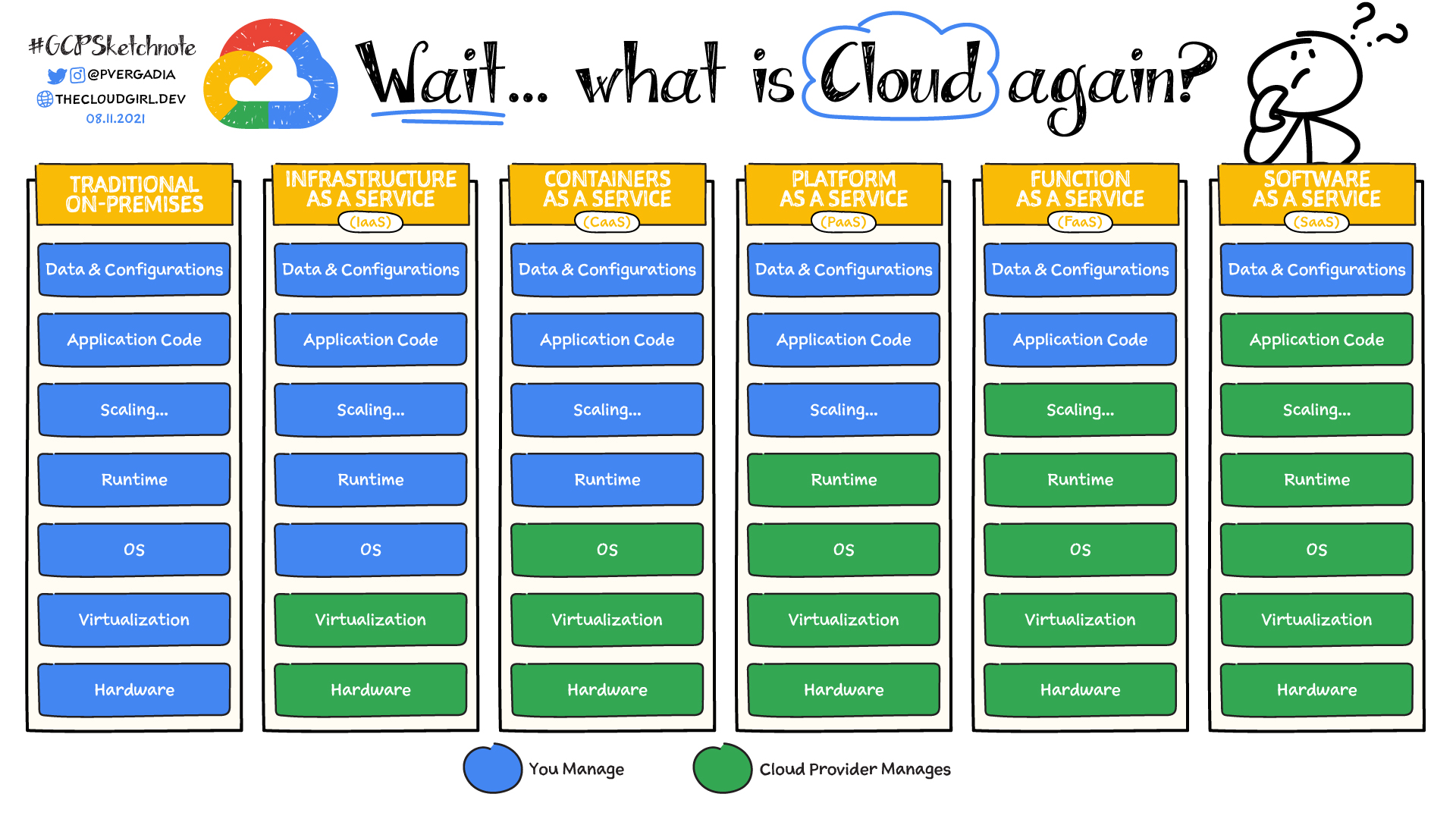
Anyway, for Render, it works via pointing it to a git repo and it builds the application and deploys on push.
So far, pretty good. Getting my web app hosted was really that easy with it. I completely understand why Heroku was so popular back when it was still a free service.
Now for the database, FSO goes with MongoDB provided by Mongo Atlas. And as for using the database in our codebase, we use the mongoose library.
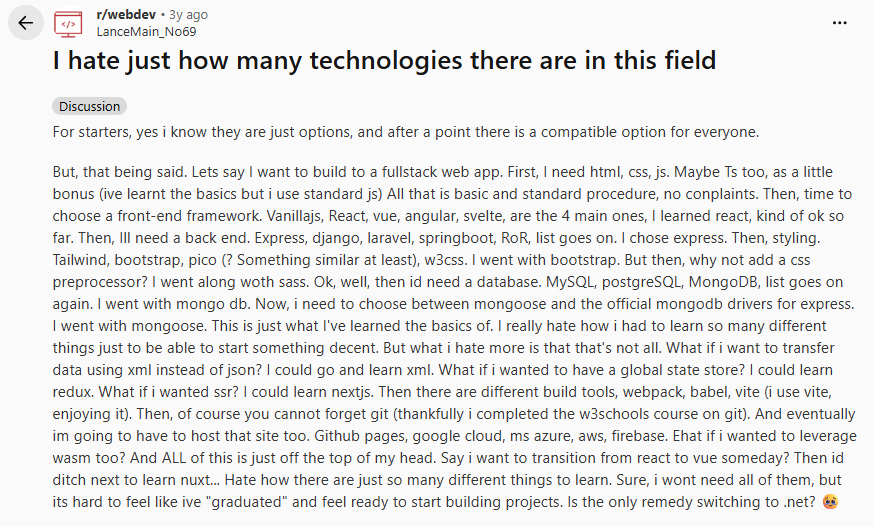
From this part of the course onwards, I can see how overwhelming web app development is and how many software devs say that they barely write code nowadays. With this much tooling and middleware, it’s seriously no surprise. I genuinely feel like this reddit post right now:
The dashboards themselves are incredibly overwhelming as well. I barely understand what’s going on and what I’m looking at.
But for now, I’ll cross my fingers and believe that a rough high-level understanding of what’s going on is sufficient. I never knew what every single button and menu did on Adobe Premiere or Photoshop myself after all.
Progress so far in a Diagram
A simple block diagram explaining the state of the stack:
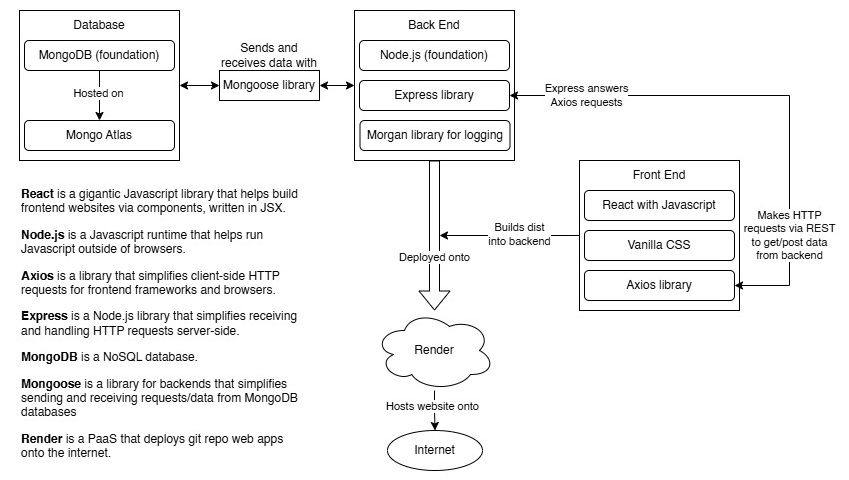
This is what people call a MERN stack, which stands for: MongoDB, Express, React, Node.js
| Previous Post | Next Post |