I Can't Believe My Derived Data Needs Its Own State!
Off topic rambling
I decided to try hosting this document on my github pages. For now I’ll be lazy and simply continue writing this in a google document, then export it all as a .html and push it onto the repo. The website is not the most readable and the content is stuck to the left of the container. I’ll have to do something about this.
Though to be honest, I’m not really sure how I would fix this. I guess I could make some sort of markdown viewer/generator that converts my entries into raw HTML that I’ll just tack onto the bottom of the page? That’s very neocities-esque but not quite smart web development wise.
There has to be a way to store each post data in some format and then get something to display it in some other format. I just don’t know enough to know how to transform that in this context (github pages). I’ll look into what Jekyll is.
EDIT 2026/07/12: I’ve ported the website to Jekyll. Now I need to look into making it look more interesting than the default minima theme
Full Stack Open (FSO) Progress thus far
In terms of FSO, I’ve finished up the optional exercises (part 2.18 to 2.20). Making something completely from the ground up all over again was a whole ride. My biggest trouble with the exercises was setting the states. It’s important to remember when I can use a component to display derived data and when I should use a state (the data is ‘interactive’ and changeable independent of other variables).
For example:
function App() {
  const [inputText, setInputText] = useState(null)
  const [countries, setCountries] = useState(null)


  const states = {
    inputText, setInputText,
    countries, setCountries,
  }
const Results = ({states}) => {
//Filter search results based on what's inside inputText
const filteredCountries = states.countries && states.inputText
? states.countries.filter(c =>
c.name.common.toUpperCase()
.includes(states.inputText.toUpperCase()))
: []
//Too many countries to display (more than 10 results)
if (filteredCountries.length > 10) {
return (
<div>
Too many matches, specify another filter.
</div>
)
//Show list of countries that match search result
} else if (filteredCountries.length < 10 && filteredCountries.length !== 1) {
return (
<ResultsList countries={filteredCountries} />
)
//List only contains 1 country result.
} else if (filteredCountries.length === 1) {
return <CountryDetails country={filteredCountries[0]} visible={[filteredCountries[0].name.common]}/>
}
}When the user searches for a country, we return a list of the countries that match their search input. The data used in Results does not need to use a state, as it’s completely dependent on the input text box. If the input text changes, it re-renders the page, recomputing the filteredCountries array. It doesn’t hold any independent data that needs to persist through each page render.
I may sound like I am repeating myself, which I am (I already talked about this over a week ago calculating most votes), but writing these posts is really just part of how I study.
The real trouble I faced was actually adding a button that showed country details for each search result.
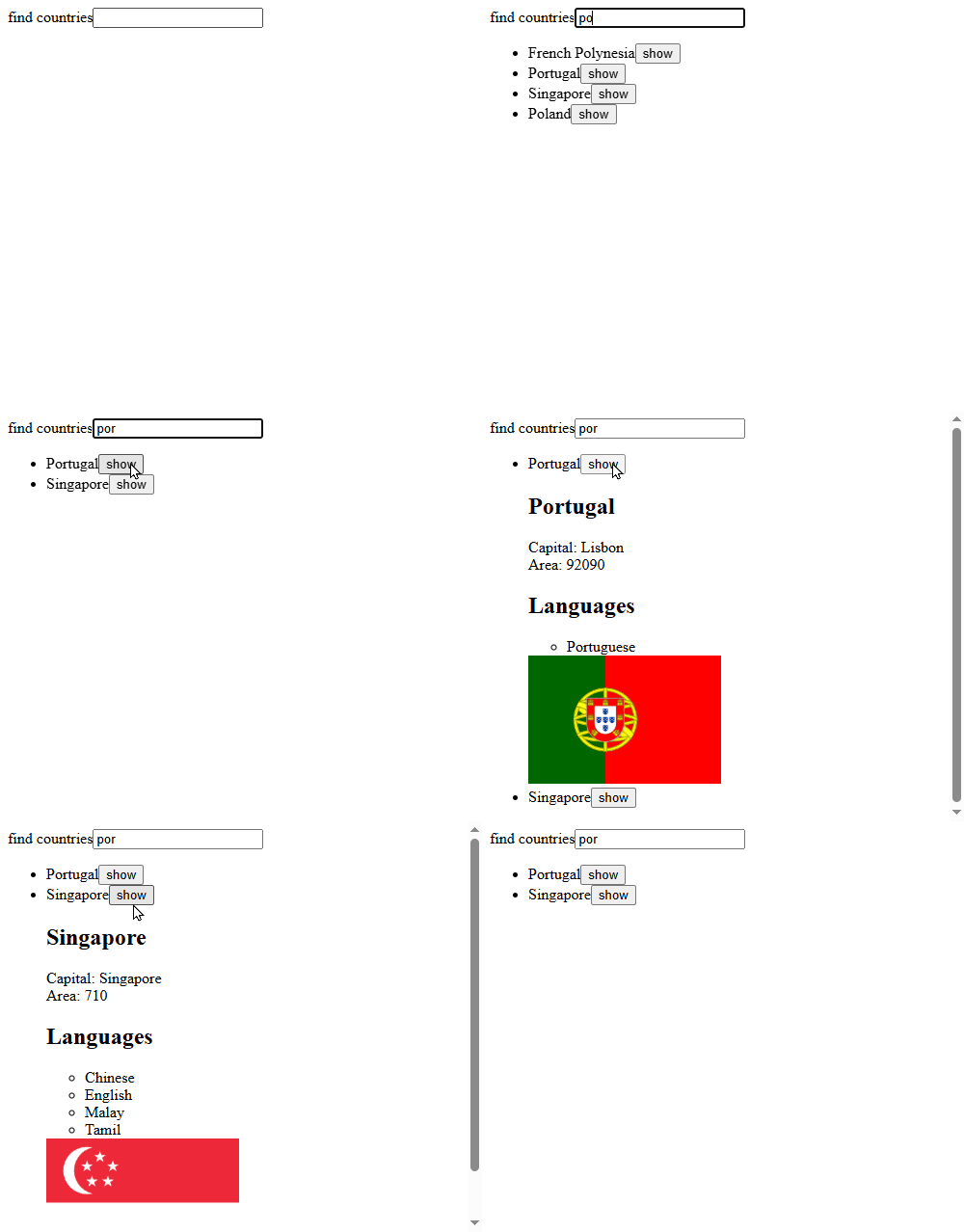
Now, the show button meant introducing an interactive element to the filtered search results. I first tried adding a visible attribute to the entire country and then using that button toggle that attribute each time it was clicked.
if (!countries) {
  axios
  .get(`https://studies.cs.helsinki.fi/restcountries/api/all`)
  .then(response => {
    setCountries(response.data.map(data => {
      return {
        ...data,
        visible: false
      }
    }))
  })
}
It worked perfectly fine, but it seemed incredibly wasteful to add a visible attribute to each and every (200+) country object in the array, when only the filtered results should care about something like that.
Adding the visible attribute to each object in filteredCountries was an idea, but it’s a derived variable. When I made the show button execute a function that changed visibility in the filteredCountries array, React has no idea that values on the page have been directly mutated, so it doesn’t rerender the component to show the updated values.
And since it’s a derived variable, when the page does get rerendered by some other state change, the filteredCountries array is remade and the visibility attribute is reset across the board again.
So I went back to the drawing board and thought about using a state for the filteredCountries result, but it was a pretty bad idea as it causes an infinite render loop whenever I set its state. Because when it updates, it re-renders the page, causing it to satisfy both countries and input box conditions, causing it to recalculate and set its state and re-render again, and so on.
I could fix it with useEffect, but it’s not a wise idea to use a setState inside of a useEffect, as it causes an extra unnecessary render. Inefficient.
The final fix was to create a state array of visible countries. Any country name present in the array means that its details are shown on the page.
const toggleVisibility = (visible, setVisible, countryName) => {
  //If country is not in the visible list, add to visible array
  if (!visible.find(c => c === countryName)) {
    setVisible([...visible, countryName])
  //Else remove it
  } else {
    setVisible(visible.filter(c => c !== countryName))
  }
}
And then each list item returns as such:
const list = countries.map(country =>
    <li key={country.name.common}>
      {country.name.common}
      <button onClick={() => toggleVisibility(visible, setVisible, country.name.common)}>show</button>
      <CountryDetails country={country} visible={visible}/>
    </li>
  )
Now the country details component can decide whether to be visible or not based on the visible array.
This was challenging but also incredibly fun. I have a very long way to go before I’m ready with all of this.
| Previous Post | Next Post |