<?xml version="1.0" encoding="utf-8"?><feed xmlns="http://www.w3.org/2005/Atom" ><generator uri="https://jekyllrb.com/" version="3.10.0">Jekyll</generator><link href="/feed.xml" rel="self" type="application/atom+xml" /><link href="/" rel="alternate" type="text/html" /><updated>2026-07-26T06:03:10+00:00</updated><id>/feed.xml</id><title type="html">kzrtn</title><subtitle>All things related to computer science and full stack web development.</subtitle><entry><title type="html">Clean Express Backend Project Structuring and More Javascript Operators</title><link href="/2026/07/26/project-structures.html" rel="alternate" type="text/html" title="Clean Express Backend Project Structuring and More Javascript Operators" /><published>2026-07-26T00:00:00+00:00</published><updated>2026-07-26T00:00:00+00:00</updated><id>/2026/07/26/project-structures</id><content type="html" xml:base="/2026/07/26/project-structures.html"><![CDATA[<p>Roughly a week off of FSO makes me feel a bit nervous, I’ve only finished the first 3 parts! Although, I’ve already learned so much. I went back to look at the <a href="https://docs.discord.com/developers/quick-start/getting-started">start up example for the discord bots</a> and I can actually follow what’s going on now. Since the backend used is node express, I’m pretty sure I can actually link a discord bot to applications I create in FSO. It is only a matter of login and authentication now (to which I’m not certain on how to implement just yet).</p>

<p><br /></p>
<h2 id="more-javascript-operators">More Javascript Operators</h2>
<p>I found out about even more question mark operators in Javascript that I had no idea about. Looks like Javascript overloads <code class="language-plaintext highlighter-rouge">?</code> for a few different things, let’s compile them here:</p>

<p><strong>1. Ternary operator <code class="language-plaintext highlighter-rouge">?</code>:</strong></p>

<p>The classic conditional expression has been around since C.</p>
<div class="language-js highlighter-rouge"><div class="highlight"><pre class="highlight"><code><span class="kd">const</span> <span class="nx">status</span> <span class="o">=</span> <span class="nx">condition</span> <span class="p">?</span> <span class="kc">true</span> <span class="p">:</span> <span class="kc">false</span>
</code></pre></div></div>

<p><strong>2. Optional chaining <code class="language-plaintext highlighter-rouge">?</code>.</strong></p>

<p>This was a new one for me. It’s a way for an object to safely access a property/method only if the property/method before it isn’t <code class="language-plaintext highlighter-rouge">null</code>/<code class="language-plaintext highlighter-rouge">undefined</code>. Stops evaluation and returns <code class="language-plaintext highlighter-rouge">undefined</code> instead of throwing. A great way to test if a property exists in an object without using a try catch, which means you can further chain it with other operators.</p>
<div class="language-js highlighter-rouge"><div class="highlight"><pre class="highlight"><code><span class="nx">user</span><span class="p">?.</span><span class="nx">profile</span><span class="p">?.</span><span class="nx">name</span>  <span class="c1">// property access</span>
<span class="nx">user</span><span class="p">?.</span><span class="nx">getName</span><span class="p">?.()</span>  <span class="c1">// method call that only calls if getName exists</span>
<span class="nx">arr</span><span class="p">?.[</span><span class="mi">0</span><span class="p">]</span> <span class="c1">// array/computed access</span>
</code></pre></div></div>

<p><strong>3. Nullish coalescing <code class="language-plaintext highlighter-rouge">??</code></strong></p>

<p>It’s like <code class="language-plaintext highlighter-rouge">||</code>, it returns the right value only if the left value is <code class="language-plaintext highlighter-rouge">null</code> or <code class="language-plaintext highlighter-rouge">undefined</code>. <code class="language-plaintext highlighter-rouge">||</code> triggers the right value if the left is falsy. This version keeps it strict to <code class="language-plaintext highlighter-rouge">null</code> or <code class="language-plaintext highlighter-rouge">undefined</code>.</p>
<div class="language-js highlighter-rouge"><div class="highlight"><pre class="highlight"><code><span class="kd">const</span> <span class="nx">value</span> <span class="o">=</span> <span class="nx">value1</span> <span class="o">??</span> <span class="nx">value2</span>
<span class="c1">//if value1 is not null/undefined, set to value1. Else set to value2</span>
</code></pre></div></div>

<p><strong>4. Nullish coalescing assignment <code class="language-plaintext highlighter-rouge">??=</code></strong></p>

<p>Basically an assignment version of nullish coalescing:</p>
<div class="language-js highlighter-rouge"><div class="highlight"><pre class="highlight"><code><span class="nx">options</span><span class="p">.</span><span class="nx">timeout</span> <span class="o">??=</span> <span class="mi">5000</span> <span class="c1">//assigns only if the variable isn’t currently null or undefined</span>
</code></pre></div></div>

<p>Speaking of the nullish coalescing assignment, there’s also the other assignments for the guard operator and OR operator: <code class="language-plaintext highlighter-rouge">&amp;&amp;=</code> and <code class="language-plaintext highlighter-rouge">||=</code>. They basically shorten things like:</p>
<div class="language-js highlighter-rouge"><div class="highlight"><pre class="highlight"><code><span class="nx">value</span> <span class="o">&amp;&amp;=</span> <span class="nx">newValue</span> <span class="c1">//sets to newValue if value is truthy</span>
<span class="nx">value</span> <span class="o">||=</span> <span class="nx">newValue</span> <span class="c1">//value is set to newValue if value is falsy</span>
</code></pre></div></div>

<p><br /></p>
<h2 id="express-project-structures">Express Project Structures</h2>
<p>The first focus of FSO part 4A is on project structuring. Best practices when working with node/express is to split the app and server files. Splitting them will make it easier to maintain, re-use and test separately. This concept is called <a href="https://www.geeksforgeeks.org/software-engineering/separation-of-concerns-soc/">separation of concerns</a>.</p>

<p>In order to follow best practices, moving route handlers to a dedicated module is required. The router object on express is a middleware, something like a ‘mini-app’, it’s only able to perform middleware and routing functions. It’s self contained and has no server of its own. Its pathing is also relative to where it was mounted. E.g.</p>
<div class="language-js highlighter-rouge"><div class="highlight"><pre class="highlight"><code><span class="kd">const</span> <span class="nx">notesRouter</span> <span class="o">=</span> <span class="nx">require</span><span class="p">(</span><span class="dl">'</span><span class="s1">./controllers/notes.js</span><span class="dl">'</span><span class="p">)</span>
<span class="nx">app</span><span class="p">.</span><span class="nx">use</span><span class="p">(</span><span class="dl">'</span><span class="s1">/api/notes</span><span class="dl">'</span><span class="p">,</span> <span class="nx">notesRouter</span><span class="p">)</span>
</code></pre></div></div>
<p>So instead of <code class="language-plaintext highlighter-rouge">.delete('/api/notes/:id', (request, response, next) =&gt; {</code>, it’s now just <code class="language-plaintext highlighter-rouge">.delete('/:id', (request, response, next) =&gt; {</code> inside the <code class="language-plaintext highlighter-rouge">notesRouter</code> itself.</p>

<p>Also,</p>
<div class="language-js highlighter-rouge"><div class="highlight"><pre class="highlight"><code><span class="kd">const</span> <span class="nx">app</span> <span class="o">=</span> <span class="nx">express</span><span class="p">()</span>
</code></pre></div></div>
<p>This creates a top level application object. It’s the actual server instance that listens to the port on the machine. Which means that backend software has no awareness of domains, DNS, or URLs at all. It’s the thing above the backend that handles the translation of (URL -&gt; DNS -&gt; IP -&gt; backend url) like Heroku/Render/etc.</p>

<p>What exactly handles the translation on PaAS is a reverse proxy (nginx, a cloud load balancer, etc). It is the thing that listens on the public-facing port (442), terminates HTTPS, and then forwards the request internally to whatever the app is actually running. <a href="https://youtu.be/L0jMBrCEQNQ?si=tyoUGPt1AYDSB5ZX">This video</a> is a fantastic resource that explains how nginx works internally.</p>

<p>I looked more into express project structuring and <a href="https://www.dhiwise.com/post/express-js-folder-structure-best-practices-for-clean-code">this article</a> lays it out in more detail than FSO. Also, FSO’s note project structure is missing a services folder. Some of the files in FSO are combined together (E.g. controller file is combined with the service file, the route handler functions include logic that manipulates the data)</p>

<p><br />
Project structure should be as follows:</p>

<h3 id="controllers">controllers</h3>
<ul>
  <li>For files that deal with HTTP requests</li>
  <li>Validates/parses inputs</li>
  <li>Calls appropriate service/model</li>
  <li>const noteService = require(‘../services/noteService’)</li>
</ul>

<div class="language-js highlighter-rouge"><div class="highlight"><pre class="highlight"><code><span class="kd">const</span> <span class="nx">getAllNotes</span> <span class="o">=</span> <span class="k">async</span> <span class="p">(</span><span class="nx">req</span><span class="p">,</span> <span class="nx">res</span><span class="p">)</span> <span class="o">=&gt;</span> <span class="p">{</span>
  <span class="kd">const</span> <span class="nx">notes</span> <span class="o">=</span> <span class="k">await</span> <span class="nx">noteService</span><span class="p">.</span><span class="nx">getAll</span><span class="p">()</span>
  <span class="nx">res</span><span class="p">.</span><span class="nx">json</span><span class="p">(</span><span class="nx">notes</span><span class="p">)</span>
<span class="p">}</span>

<span class="kd">const</span> <span class="nx">createNote</span> <span class="o">=</span> <span class="k">async</span> <span class="p">(</span><span class="nx">req</span><span class="p">,</span> <span class="nx">res</span><span class="p">)</span> <span class="o">=&gt;</span> <span class="p">{</span>
  <span class="kd">const</span> <span class="nx">savedNote</span> <span class="o">=</span> <span class="k">await</span> <span class="nx">noteService</span><span class="p">.</span><span class="nx">createNote</span><span class="p">(</span><span class="nx">req</span><span class="p">.</span><span class="nx">body</span><span class="p">)</span>
  <span class="nx">res</span><span class="p">.</span><span class="nx">status</span><span class="p">(</span><span class="mi">201</span><span class="p">).</span><span class="nx">json</span><span class="p">(</span><span class="nx">savedNote</span><span class="p">)</span>
<span class="p">}</span>

<span class="nx">module</span><span class="p">.</span><span class="nx">exports</span> <span class="o">=</span> <span class="p">{</span> <span class="nx">getAllNotes</span><span class="p">,</span> <span class="nx">createNote</span> <span class="p">}</span>
</code></pre></div></div>

<h3 id="models">models</h3>
<ul>
  <li>Database stuff. Data schema definitions</li>
</ul>

<div class="language-js highlighter-rouge"><div class="highlight"><pre class="highlight"><code><span class="kd">const</span> <span class="nx">noteSchema</span> <span class="o">=</span> <span class="k">new</span> <span class="nx">mongoose</span><span class="p">.</span><span class="nx">Schema</span><span class="p">({</span>
  <span class="na">content</span><span class="p">:</span> <span class="nb">String</span><span class="p">,</span>
  <span class="na">important</span><span class="p">:</span> <span class="nb">Boolean</span>
<span class="p">})</span>

<span class="nx">module</span><span class="p">.</span><span class="nx">exports</span> <span class="o">=</span> <span class="nx">mongoose</span><span class="p">.</span><span class="nx">model</span><span class="p">(</span><span class="dl">'</span><span class="s1">Note</span><span class="dl">'</span><span class="p">,</span> <span class="nx">noteSchema</span><span class="p">)</span>
</code></pre></div></div>

<h3 id="services">services</h3>
<ul>
  <li>For program logic, like calculations, data handling etc</li>
  <li>The stuff handles the manipulation of data, the stuff the controller will call for their HTTP requests</li>
  <li>Doesn’t contain raw connection/query code for the database (that should be in model instead)</li>
</ul>

<div class="language-js highlighter-rouge"><div class="highlight"><pre class="highlight"><code><span class="kd">const</span> <span class="nx">Note</span> <span class="o">=</span> <span class="nx">require</span><span class="p">(</span><span class="dl">'</span><span class="s1">../models/note</span><span class="dl">'</span><span class="p">)</span>

<span class="kd">const</span> <span class="nx">createNote</span> <span class="o">=</span> <span class="p">(</span><span class="nx">body</span><span class="p">)</span> <span class="o">=&gt;</span> <span class="p">{</span>
  <span class="kd">const</span> <span class="nx">note</span> <span class="o">=</span> <span class="k">new</span> <span class="nx">Note</span><span class="p">({</span>
    <span class="na">content</span><span class="p">:</span> <span class="nx">body</span><span class="p">.</span><span class="nx">content</span><span class="p">,</span>
    <span class="na">important</span><span class="p">:</span> <span class="nx">body</span><span class="p">.</span><span class="nx">important</span> <span class="o">||</span> <span class="kc">false</span><span class="p">,</span>
  <span class="p">})</span>
  <span class="k">return</span> <span class="nx">note</span><span class="p">.</span><span class="nx">save</span><span class="p">()</span>
<span class="p">}</span>

<span class="nx">module</span><span class="p">.</span><span class="nx">exports</span> <span class="o">=</span> <span class="p">{</span> <span class="nx">createNote</span> <span class="p">}</span>
</code></pre></div></div>

<h3 id="utils">utils</h3>
<ul>
  <li>Small pure functions like date formatting, currency conversion etc</li>
  <li>Type of tools that can be copy pasted into completely different projects without any modification whatsoever</li>
</ul>

<div class="language-js highlighter-rouge"><div class="highlight"><pre class="highlight"><code><span class="nx">exports</span><span class="p">.</span><span class="nx">formatDate</span> <span class="o">=</span> <span class="p">(</span><span class="nx">date</span><span class="p">)</span> <span class="o">=&gt;</span>
  <span class="k">new</span> <span class="nx">Intl</span><span class="p">.</span><span class="nx">DateTimeFormat</span><span class="p">(</span><span class="dl">'</span><span class="s1">en-US</span><span class="dl">'</span><span class="p">).</span><span class="nx">format</span><span class="p">(</span><span class="nx">date</span><span class="p">);</span>
</code></pre></div></div>

<h3 id="routes">routes</h3>
<ul>
  <li>Maps the URL/methods to controller functions</li>
  <li>Should not contain any logic</li>
</ul>

<div class="language-js highlighter-rouge"><div class="highlight"><pre class="highlight"><code><span class="kd">const</span> <span class="nx">notesRouter</span> <span class="o">=</span> <span class="nx">require</span><span class="p">(</span><span class="dl">'</span><span class="s1">express</span><span class="dl">'</span><span class="p">).</span><span class="nx">Router</span><span class="p">()</span>
<span class="kd">const</span> <span class="nx">notesController</span> <span class="o">=</span> <span class="nx">require</span><span class="p">(</span><span class="dl">'</span><span class="s1">../controllers/notes</span><span class="dl">'</span><span class="p">)</span>

<span class="nx">notesRouter</span><span class="p">.</span><span class="kd">get</span><span class="p">(</span><span class="dl">'</span><span class="s1">/</span><span class="dl">'</span><span class="p">,</span> <span class="nx">notesController</span><span class="p">.</span><span class="nx">getAllNotes</span><span class="p">)</span>
<span class="nx">notesRouter</span><span class="p">.</span><span class="nx">post</span><span class="p">(</span><span class="dl">'</span><span class="s1">/</span><span class="dl">'</span><span class="p">,</span> <span class="nx">notesController</span><span class="p">.</span><span class="nx">createNote</span><span class="p">)</span>

<span class="nx">module</span><span class="p">.</span><span class="nx">exports</span> <span class="o">=</span> <span class="nx">notesRouter</span>
</code></pre></div></div>

<h3 id="config">config</h3>
<ul>
  <li>For configuration files (e.g. dotenv etc)</li>
</ul>

<p>It’s going to take a lot of practice before I can instinctively separate things out like so. That’s many files and folders to traverse.</p>

<p><br /></p>

<table>
  <tbody>
    <tr>
      <td><a href="../../../2026/07/16/cors-deployment.html">Previous Post</a></td>
      <td><a href="">Next Post</a></td>
    </tr>
  </tbody>
</table>]]></content><author><name></name></author><summary type="html"><![CDATA[Roughly a week off of FSO makes me feel a bit nervous, I’ve only finished the first 3 parts! Although, I’ve already learned so much. I went back to look at the start up example for the discord bots and I can actually follow what’s going on now. Since the backend used is node express, I’m pretty sure I can actually link a discord bot to applications I create in FSO. It is only a matter of login and authentication now (to which I’m not certain on how to implement just yet).]]></summary></entry><entry><title type="html">CORS and Deploying with Render</title><link href="/2026/07/16/cors-deployment.html" rel="alternate" type="text/html" title="CORS and Deploying with Render" /><published>2026-07-16T00:00:00+00:00</published><updated>2026-07-16T00:00:00+00:00</updated><id>/2026/07/16/cors-deployment</id><content type="html" xml:base="/2026/07/16/cors-deployment.html"><![CDATA[<h3 id="browsers-and-cors">Browsers and CORS</h3>
<p>For security reasons, browsers have a <strong>Same Origin Policy</strong>.</p>

<p><strong>Same Origin Policy (SOP)</strong>: Scripts from one origin cannot modify other origins.
What constitutes the same origin: If their protocol (<code class="language-plaintext highlighter-rouge">http</code> vs <code class="language-plaintext highlighter-rouge">https</code>), their host (<code class="language-plaintext highlighter-rouge">URL</code>) and port is the same.</p>

<p>This is to stop websites from reading or modifying other websites maliciously (DOM access, response content of <code class="language-plaintext highlighter-rouge">fetch</code>/<code class="language-plaintext highlighter-rouge">XHR</code>, <code class="language-plaintext highlighter-rouge">localStorage</code> etc). Some things are allowed cross-origin, but restricted:
Cross-origin image,script or <code class="language-plaintext highlighter-rouge">iframe</code> (but reading its content is not allowed)
Sending cross-origin form submissions or ‘simple’ fetch requests, but you can’t read the response without CORS headers allowing it.</p>

<p>Also, this means that a single origin could modify the DOM of another tab if the origin has reference to the tab’s window object and is of the same origin (e.g. Tab A opens Tab B via <code class="language-plaintext highlighter-rouge">window.open()</code> or <code class="language-plaintext highlighter-rouge">iframes</code>)</p>

<p><strong>Cross-Origin Resource Sharing (CORS)</strong> is a mechanism that helps allow origins to request data from other origins. Basically the server receiving the request needs to have their <code class="language-plaintext highlighter-rouge">Access-Control-Allow-Origin</code> header to explicitly allow the origin to make requests (or use a wildcard <code class="language-plaintext highlighter-rouge">*</code> to allow any origin to make the request). If there’s a mismatch, the browser errors.</p>

<p>It’s important to note that it’s the browser that blocks reading the response, and it’s the server that tells the browser if a request from an origin is allowed.</p>

<p>Browsers also <strong>preflight requests</strong>. For ‘non-simple’ requests (<code class="language-plaintext highlighter-rouge">PUT</code>/<code class="language-plaintext highlighter-rouge">DELETE</code>, custom headers, <code class="language-plaintext highlighter-rouge">json content</code> etc), the browser sends an <code class="language-plaintext highlighter-rouge">OPTIONS</code> request to check permissions via <code class="language-plaintext highlighter-rouge">Access-Control-Allow-Methods</code> and <code class="language-plaintext highlighter-rouge">Access-Control-Allow-Headers</code> before sending the actual request.</p>

<p>The wildcard <code class="language-plaintext highlighter-rouge">*</code> doesn’t work with credentials. If the request includes cookies or Authorization headers, &amp; is rejected by the browser. The server MUST specify an exact origin and set <code class="language-plaintext highlighter-rouge">Access-Control-Allow-Credentials</code> to true.</p>

<p><br /></p>
<h3 id="deploying-to-the-internet-with-render">Deploying to the Internet with Render</h3>
<p>With <a href="https://render.com">Render</a>, I began my very first exposure to hosting a full stack web app on the internet.</p>

<p>Render is a <strong>Platform-as-a-Service (PaaS)</strong> provider. Basically, we can deploy our web apps to the service and it takes care of the deployment, scaling, SSL certificates, OS, middleware, databases and other services to host our application.</p>

<p>In <strong>cloud computing</strong> (Which is basically on demand rental IT resources and computing services, like servers, storage, databases, over the internet. Pay as you go services), there are four services:</p>
<ul>
  <li>Infrastructure-as-a-Service (IaaS)</li>
  <li>Containers-as-a-Service (CaaS)</li>
  <li>Platform-as-a-Service (PaaS)</li>
  <li>Software-as-a-Service (SaaS)</li>
</ul>

<p>It’s a lot and a lot to cover, a really useful resource that goes through all of them is <a href="https://cloud.google.com/learn/paas-vs-iaas-vs-saas">this article from Google Cloud</a>.</p>

<p>This image from the article summarises each service pretty well:
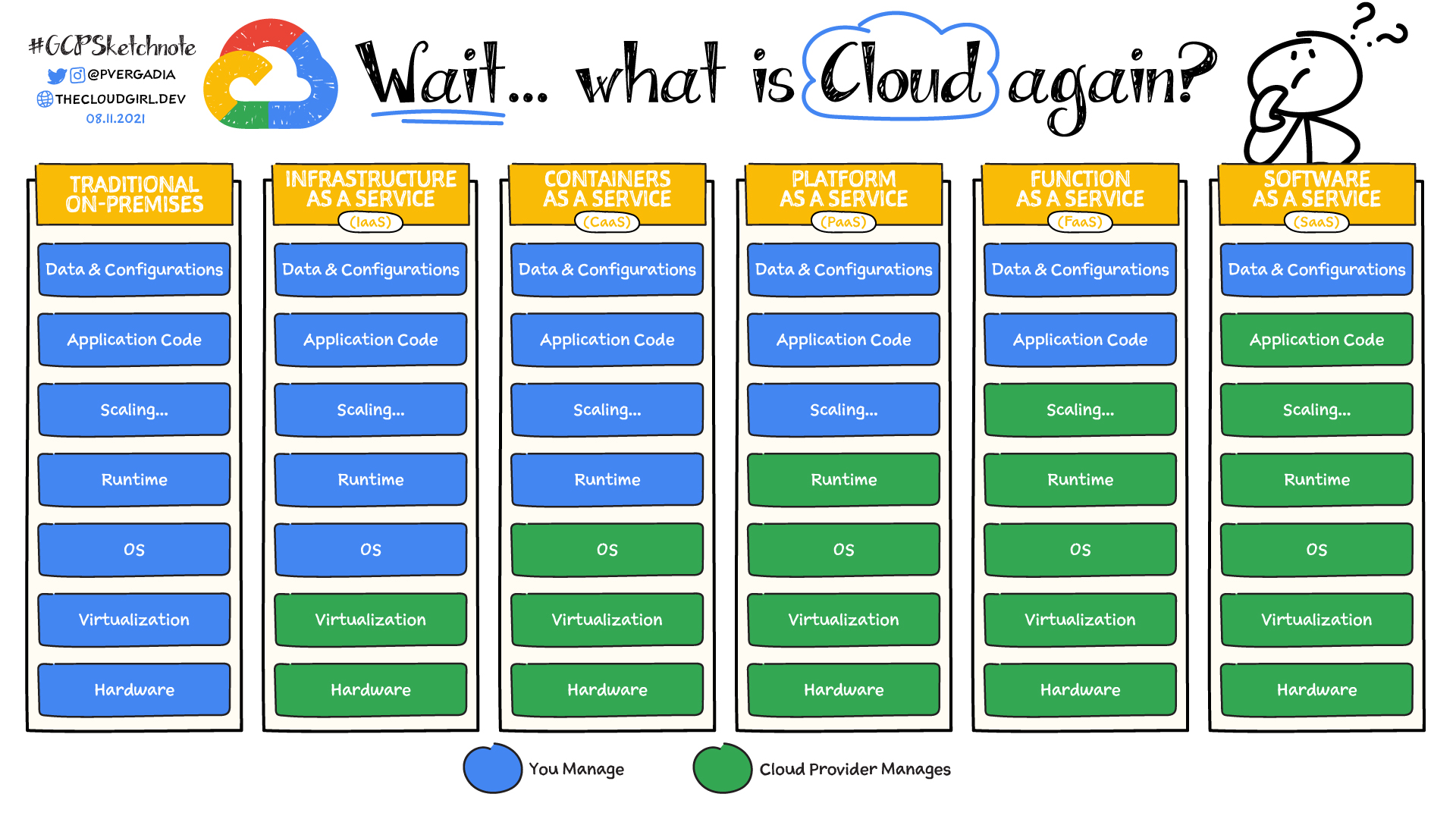
<img src="/assets/images/google-cloud.png" alt="Image" /></p>

<p>Anyway, for Render, it works via pointing it to a git repo and it builds the application and deploys on push.</p>

<p>So far, pretty good. Getting my web app hosted was really that easy with it. I completely understand why <a href="https://www.heroku.com/">Heroku</a> was so popular back when it was still a free service.</p>

<p>Now for the database, FSO goes with MongoDB provided by <a href="https://www.mongodb.com/">Mongo Atlas</a>. And as for using the database in our codebase, we use the mongoose library.</p>

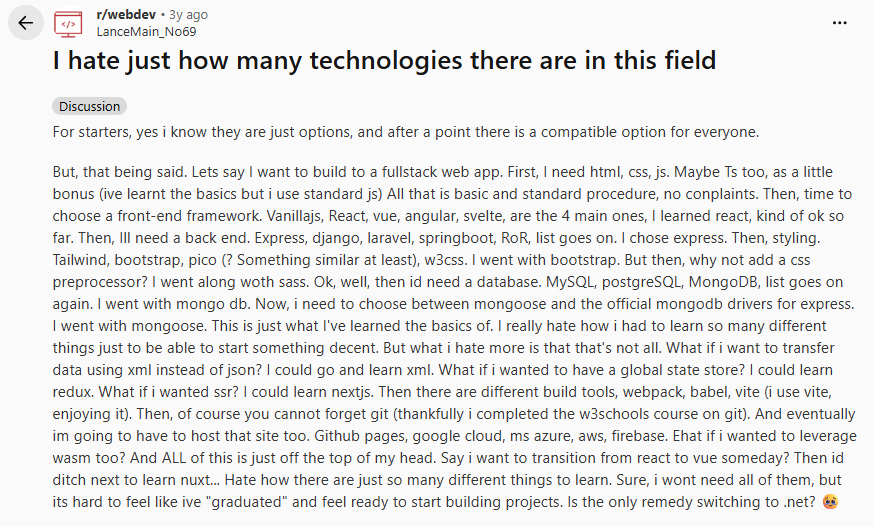
<p>From this part of the course onwards, I can see how overwhelming web app development is and how many software devs say that they barely write code nowadays. With this much tooling and middleware, it’s seriously no surprise. I genuinely feel like <a href="https://www.reddit.com/r/webdev/comments/15z4ayh/i_hate_just_how_many_technologies_there_are_in/">this reddit post</a> right now:
<img src="/assets/images/reddit-post.png" alt="Image" /></p>

<p>The dashboards themselves are incredibly overwhelming as well. I barely understand what’s going on and what I’m looking at.</p>

<p>But for now, I’ll cross my fingers and believe that a rough high-level understanding of what’s going on is sufficient. I never knew what every single button and menu did on Adobe Premiere or Photoshop myself after all.</p>

<p><br /></p>
<h3 id="progress-so-far-in-a-diagram">Progress so far in a Diagram</h3>
<p>A simple block diagram explaining the state of the stack:
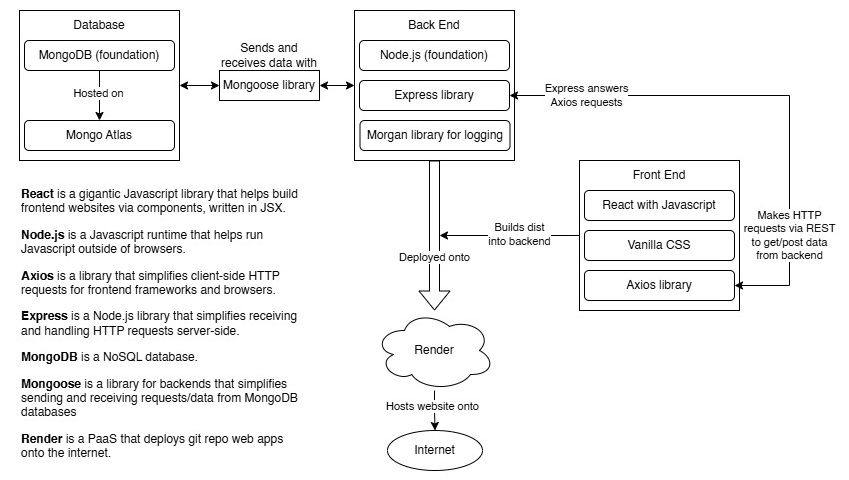
<img src="/assets/images/mern-stack.jpg" alt="Image" /></p>

<p>This is what people call a <strong>MERN</strong> stack, which stands for: <strong>MongoDB</strong>, <strong>Express</strong>, <strong>React</strong>, <strong>Node.js</strong></p>

<p><br /></p>

<table>
  <tbody>
    <tr>
      <td><a href="../../../2026/07/13/node-rest-http.html">Previous Post</a></td>
      <td><a href="../../../2026/07/26/project-structures.html">Next Post</a></td>
    </tr>
  </tbody>
</table>]]></content><author><name></name></author><summary type="html"><![CDATA[Browsers and CORS For security reasons, browsers have a Same Origin Policy.]]></summary></entry><entry><title type="html">Node, REST, HTTP Standards, Semantic versioning and Javascript pain</title><link href="/2026/07/13/node-rest-http.html" rel="alternate" type="text/html" title="Node, REST, HTTP Standards, Semantic versioning and Javascript pain" /><published>2026-07-13T00:00:00+00:00</published><updated>2026-07-13T00:00:00+00:00</updated><id>/2026/07/13/node-rest-http</id><content type="html" xml:base="/2026/07/13/node-rest-http.html"><![CDATA[<p>And so it was time for part 3 of FSO. While I wish I could progress even faster, rushing through this has little benefit if it means less understanding of the material. Although, as I continue to code, I realise how much of it requires practice, learned repetition, and exposure to new errors/concepts.</p>

<p>Alright, let’s take a look at the new theories introduced.</p>

<p><br /></p>
<h3 id="what-is-node">What is Node?</h3>
<p>FSO and Node themselves state Node as:
“Node.js® is a free, open-source, cross-platform JavaScript runtime environment that lets developers create servers, web apps, command line tools and scripts.”</p>

<p>That doesn’t really tell me much. But thankfully reddit users break it down perfectly in <a href="https://www.reddit.com/r/learnjavascript/comments/3d4hs5/eli5_what_in_the_heck_is_nodejs/">this thread</a>. The tldr is:</p>
<ul>
  <li>Node lets you run Javascript code outside of your browser</li>
  <li>Node is able to run HTTP applications written in Javascript</li>
</ul>

<p>Node uses <code class="language-plaintext highlighter-rouge">require()</code> to import modules. This is because back when Node.js was created back in 2009, Javascript had no native module system (import/export ES modules only standardized in ES2015). So Node adopted CommonJS, which uses <code class="language-plaintext highlighter-rouge">require()</code> to import modules. Node currently supports ES6 modules, but in FSO they’re sticking to CommonJS modules.</p>

<p><br /></p>
<h3 id="semantic-versioning">Semantic Versioning</h3>
<p>Semantic versioning is a way of naming versions numbers following the semantic versioning spec. It makes it easier to tell how much the new version has changed and if it’s backwards compatible.</p>

<table>
  <thead>
    <tr>
      <th>Code status</th>
      <th>Stage</th>
      <th>Rule</th>
      <th>Example version</th>
    </tr>
  </thead>
  <tbody>
    <tr>
      <td>First release</td>
      <td>New product</td>
      <td>Start with 1.0.0</td>
      <td>1.0.0</td>
    </tr>
    <tr>
      <td>Backward compatible, bug fixes</td>
      <td>Patch release</td>
      <td>Increment the 3rd digit</td>
      <td>1.0.1</td>
    </tr>
    <tr>
      <td>Backward compatible, new features</td>
      <td>Minor release</td>
      <td>Increment the middle digit and reset last digit to zero</td>
      <td>1.1.0</td>
    </tr>
    <tr>
      <td>Changes that break backward compatibility</td>
      <td>Major release</td>
      <td>Increment the first digit and reset middle and last digits to zero</td>
      <td>2.0.0</td>
    </tr>
  </tbody>
</table>

<p>So what’s this? OwO</p>

<figure class="highlight"><pre><code class="language-json" data-lang="json"><span class="nl">"dependencies"</span><span class="p">:</span><span class="w"> </span><span class="p">{</span><span class="w">
  </span><span class="nl">"my_dep"</span><span class="p">:</span><span class="w"> </span><span class="s2">"^1.0.0"</span><span class="p">,</span><span class="w">
  </span><span class="nl">"another_dep"</span><span class="p">:</span><span class="w"> </span><span class="s2">"~2.2.0"</span><span class="w">
</span><span class="p">}</span></code></pre></figure>

<p>The caret in front of <code class="language-plaintext highlighter-rouge">^1.0.0</code> means that if and when the dependencies of a project are updated, the version of Express that is installed is at least <code class="language-plaintext highlighter-rouge">1.0.0</code>. But the installed version can have a larger patch number (the last number) or larger minor number (the middle number). The major version (the first number) has to be the same.</p>

<p><code class="language-plaintext highlighter-rouge">~</code> means that it only accepts patch releases (the last number).</p>

<p><br /></p>
<h3 id="const-variables-in-javascript-and-pain">const variables in javascript and pain</h3>
<p>Javascript is such a special language because ahahaha ooh my GOD what is happening here??
I briefly mentioned it once in <a href="../../../2026/07/07/useful-javascript.html">my previous post</a> but my goodness, <code class="language-plaintext highlighter-rouge">const</code> not actually being an immutable constant is such a trip.</p>

<p>So how does it work?</p>

<p>In Javascript, a <code class="language-plaintext highlighter-rouge">const</code> is a constant reference to a value. Which means that it’s the memory address that the variable points to that cannot be changed. This is why you can modify attributes in a Javascript object but not re-assign it to a whole new object. The former is modifying the data in the same memory address, the other is re-pointing the variable to a different object in memory. This makes it much easier to remember and understand.</p>

<p><br /></p>
<h3 id="about-http-requests">About HTTP requests</h3>
<p>Some useful acronyms I’ll run into often in web development and network architecture:</p>

<p><strong>REST</strong> (Representational State Transfer) is an architectural style meant for building scalable web applications.</p>

<p><strong>CRUD:</strong> Create, read, update, and delete. The four basic operations of persistent storage.</p>

<p>There is also a request type <code class="language-plaintext highlighter-rouge">HEAD</code>, which does not return anything but status code and response headers (no response body).</p>

<p>The HTTP standard talks about two properties related to request types:</p>
<ul>
  <li><strong>Safety:</strong> Executing requests must not cause any side effects on the server (aka the GET request cannot cause any database changes). The response must only return data that already exists on the server.</li>
  <li><strong>All HTTP requests should be idempotent:</strong> If a request does generate side effects, then the result should be the same regardless of how many times the request is sent. So HTTP PUT requests should result in the same thing no matter how many times the same PUT request is sent.</li>
</ul>

<p>Both safety and idempotence are recommendations in the HTTP standard and not something that is guaranteed based on the request type.</p>

<p><br /></p>

<table>
  <tbody>
    <tr>
      <td><a href="../../../2026/07/11/derived-data-states.html">Previous Post</a></td>
      <td><a href="../../../2026/07/16/cors-deployment.html">Next Post</a></td>
    </tr>
  </tbody>
</table>]]></content><author><name></name></author><summary type="html"><![CDATA[And so it was time for part 3 of FSO. While I wish I could progress even faster, rushing through this has little benefit if it means less understanding of the material. Although, as I continue to code, I realise how much of it requires practice, learned repetition, and exposure to new errors/concepts.]]></summary></entry><entry><title type="html">I Can’t Believe My Derived Data Needs Its Own State!</title><link href="/2026/07/11/derived-data-states.html" rel="alternate" type="text/html" title="I Can’t Believe My Derived Data Needs Its Own State!" /><published>2026-07-11T00:00:00+00:00</published><updated>2026-07-11T00:00:00+00:00</updated><id>/2026/07/11/derived-data-states</id><content type="html" xml:base="/2026/07/11/derived-data-states.html"><![CDATA[<h3 id="off-topic-rambling">Off topic rambling</h3>
<p>I decided to try hosting this document on my github pages. For now I’ll be lazy and simply continue writing this in a google document, then export it all as a <code class="language-plaintext highlighter-rouge">.html</code> and push it onto the repo. The website is not the most readable and the content is stuck to the left of the container. I’ll have to do something about this.</p>

<p>Though to be honest, I’m not really sure how I would fix this. I guess I could make some sort of markdown viewer/generator that converts my entries into raw HTML that I’ll just tack onto the bottom of the page? That’s very neocities-esque but not quite smart web development wise.</p>

<p>There has to be a way to store each post data in some format and then get something to display it in some other format. I just don’t know enough to know how to transform that in this context (github pages). I’ll look into what Jekyll is.</p>

<p><em>EDIT 2026/07/12: I’ve ported the website to Jekyll. Now I need to look into making it look more interesting than the default minima theme</em></p>

<h3 id="full-stack-open-fso-progress-thus-far">Full Stack Open (FSO) Progress thus far</h3>
<p>In terms of FSO, I’ve finished up the optional exercises (part 2.18 to 2.20). Making something completely from the ground up all over again was a whole ride. My biggest trouble with the exercises was setting the states. It’s important to remember when I can use a component to display derived data and when I should use a state (the data is ‘interactive’ and changeable independent of other variables).</p>

<p>For example:</p>

<figure class="highlight"><pre><code class="language-jsx" data-lang="jsx"><span class="kd">function</span> <span class="nx">App</span><span class="p">()</span> <span class="p">{</span>
  <span class="kd">const</span> <span class="p">[</span><span class="nx">inputText</span><span class="p">,</span> <span class="nx">setInputText</span><span class="p">]</span> <span class="o">=</span> <span class="nx">useState</span><span class="p">(</span><span class="kc">null</span><span class="p">)</span>
  <span class="kd">const</span> <span class="p">[</span><span class="nx">countries</span><span class="p">,</span> <span class="nx">setCountries</span><span class="p">]</span> <span class="o">=</span> <span class="nx">useState</span><span class="p">(</span><span class="kc">null</span><span class="p">)</span>


  <span class="kd">const</span> <span class="nx">states</span> <span class="o">=</span> <span class="p">{</span>
    <span class="nx">inputText</span><span class="p">,</span> <span class="nx">setInputText</span><span class="p">,</span>
    <span class="nx">countries</span><span class="p">,</span> <span class="nx">setCountries</span><span class="p">,</span>
  <span class="p">}</span></code></pre></figure>

<figure class="highlight"><pre><code class="language-jsx" data-lang="jsx"><span class="kd">const</span> <span class="nx">Results</span> <span class="o">=</span> <span class="p">({</span><span class="nx">states</span><span class="p">})</span> <span class="o">=&gt;</span> <span class="p">{</span>
  <span class="c1">//Filter search results based on what's inside inputText</span>
  <span class="kd">const</span> <span class="nx">filteredCountries</span> <span class="o">=</span> <span class="nx">states</span><span class="p">.</span><span class="nx">countries</span> <span class="o">&amp;&amp;</span> <span class="nx">states</span><span class="p">.</span><span class="nx">inputText</span>
    <span class="p">?</span> <span class="nx">states</span><span class="p">.</span><span class="nx">countries</span><span class="p">.</span><span class="nx">filter</span><span class="p">(</span><span class="nx">c</span> <span class="o">=&gt;</span>
      <span class="nx">c</span><span class="p">.</span><span class="nx">name</span><span class="p">.</span><span class="nx">common</span><span class="p">.</span><span class="nx">toUpperCase</span><span class="p">()</span>
      <span class="p">.</span><span class="nx">includes</span><span class="p">(</span><span class="nx">states</span><span class="p">.</span><span class="nx">inputText</span><span class="p">.</span><span class="nx">toUpperCase</span><span class="p">()))</span>
    <span class="p">:</span> <span class="p">[]</span>
 
  <span class="c1">//Too many countries to display (more than 10 results)</span>
  <span class="k">if</span> <span class="p">(</span><span class="nx">filteredCountries</span><span class="p">.</span><span class="nx">length</span> <span class="o">&gt;</span> <span class="mi">10</span><span class="p">)</span> <span class="p">{</span>
    <span class="k">return</span> <span class="p">(</span>
      <span class="p">&lt;</span><span class="nt">div</span><span class="p">&gt;</span>
        Too many matches, specify another filter.
      <span class="p">&lt;/</span><span class="nt">div</span><span class="p">&gt;</span>
    <span class="p">)</span>
  <span class="c1">//Show list of countries that match search result</span>
  <span class="p">}</span> <span class="k">else</span> <span class="k">if</span> <span class="p">(</span><span class="nx">filteredCountries</span><span class="p">.</span><span class="nx">length</span> <span class="o">&lt;</span> <span class="mi">10</span> <span class="o">&amp;&amp;</span> <span class="nx">filteredCountries</span><span class="p">.</span><span class="nx">length</span> <span class="o">!==</span> <span class="mi">1</span><span class="p">)</span> <span class="p">{</span>    
    <span class="k">return</span> <span class="p">(</span>
      <span class="p">&lt;</span><span class="nc">ResultsList</span> <span class="na">countries</span><span class="p">=</span><span class="si">{</span><span class="nx">filteredCountries</span><span class="si">}</span> <span class="p">/&gt;</span>
    <span class="p">)</span>
  <span class="c1">//List only contains 1 country result.</span>
  <span class="p">}</span> <span class="k">else</span> <span class="k">if</span> <span class="p">(</span><span class="nx">filteredCountries</span><span class="p">.</span><span class="nx">length</span> <span class="o">===</span> <span class="mi">1</span><span class="p">)</span> <span class="p">{</span>
    <span class="k">return</span> <span class="p">&lt;</span><span class="nc">CountryDetails</span> <span class="na">country</span><span class="p">=</span><span class="si">{</span><span class="nx">filteredCountries</span><span class="p">[</span><span class="mi">0</span><span class="p">]</span><span class="si">}</span> <span class="na">visible</span><span class="p">=</span><span class="si">{</span><span class="p">[</span><span class="nx">filteredCountries</span><span class="p">[</span><span class="mi">0</span><span class="p">].</span><span class="nx">name</span><span class="p">.</span><span class="nx">common</span><span class="p">]</span><span class="si">}</span><span class="p">/&gt;</span>
  <span class="p">}</span>
<span class="p">}</span></code></pre></figure>

<p>When the user searches for a country, we return a list of the countries that match their search input. The data used in <code class="language-plaintext highlighter-rouge">Results</code> does not need to use a state, as it’s completely dependent on the input text box. If the input text changes, it re-renders the page, recomputing the <code class="language-plaintext highlighter-rouge">filteredCountries</code> array. It doesn’t hold any independent data that needs to persist through each page render.</p>

<p>I may sound like I am repeating myself, which I am (I already talked about this over a week ago calculating most votes), but writing these posts is really just part of how I study.</p>

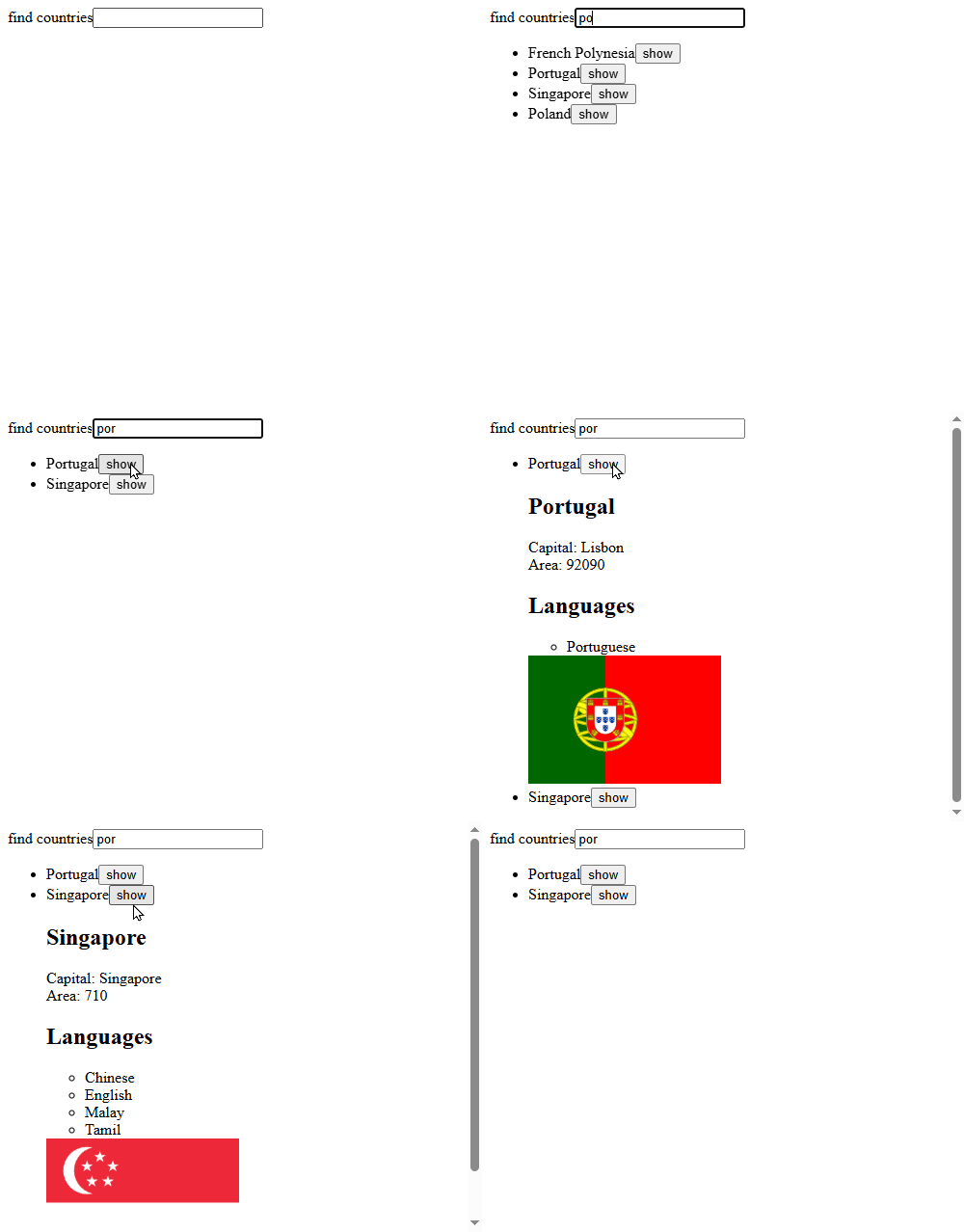
<p>The real trouble I faced was actually adding a button that showed country details for each search result.</p>

<p><img src="/assets/images/image2.gif" alt="Image" /></p>

<p>Now, the show button meant introducing an interactive element to the filtered search results. I first tried adding a visible attribute to the entire country and then using that button toggle that attribute each time it was clicked.</p>

<figure class="highlight"><pre><code class="language-jsx" data-lang="jsx"><span class="k">if</span> <span class="p">(</span><span class="o">!</span><span class="nx">countries</span><span class="p">)</span> <span class="p">{</span>
  <span class="nx">axios</span>
  <span class="p">.</span><span class="kd">get</span><span class="p">(</span><span class="s2">`https://studies.cs.helsinki.fi/restcountries/api/all`</span><span class="p">)</span>
  <span class="p">.</span><span class="nx">then</span><span class="p">(</span><span class="nx">response</span> <span class="o">=&gt;</span> <span class="p">{</span>
    <span class="nx">setCountries</span><span class="p">(</span><span class="nx">response</span><span class="p">.</span><span class="nx">data</span><span class="p">.</span><span class="nx">map</span><span class="p">(</span><span class="nx">data</span> <span class="o">=&gt;</span> <span class="p">{</span>
      <span class="k">return</span> <span class="p">{</span>
        <span class="p">...</span><span class="nx">data</span><span class="p">,</span>
        <span class="na">visible</span><span class="p">:</span> <span class="kc">false</span>
      <span class="p">}</span>
    <span class="p">}))</span>
  <span class="p">})</span>
<span class="p">}</span></code></pre></figure>

<p>It worked perfectly fine, but it seemed incredibly wasteful to add a visible attribute to each and every (200+) country object in the array, when only the filtered results should care about something like that.</p>

<p>Adding the visible attribute to each object in <code class="language-plaintext highlighter-rouge">filteredCountries</code> was an idea, but it’s a derived variable. When I made the show button execute a function that changed visibility in the <code class="language-plaintext highlighter-rouge">filteredCountries</code> array, React has no idea that values on the page have been directly mutated, so it doesn’t rerender the component to show the updated values.</p>

<p>And since it’s a derived variable, when the page does get rerendered by some other state change, the <code class="language-plaintext highlighter-rouge">filteredCountries</code> array is remade and the visibility attribute is reset across the board again.</p>

<p>So I went back to the drawing board and thought about using a state for the <code class="language-plaintext highlighter-rouge">filteredCountries</code> result, but it was a pretty bad idea as it causes an infinite render loop whenever I set its state. Because when it updates, it re-renders the page, causing it to satisfy both countries and input box conditions, causing it to recalculate and set its state and re-render again, and so on.</p>

<p>I could fix it with <code class="language-plaintext highlighter-rouge">useEffect</code>, but it’s not a wise idea to use a <code class="language-plaintext highlighter-rouge">setState</code> inside of a <code class="language-plaintext highlighter-rouge">useEffect</code>, as it causes an extra unnecessary render. Inefficient.</p>

<p>The final fix was to create a state array of visible countries. Any country name present in the array means that its details are shown on the page.</p>

<figure class="highlight"><pre><code class="language-jsx" data-lang="jsx"><span class="kd">const</span> <span class="nx">toggleVisibility</span> <span class="o">=</span> <span class="p">(</span><span class="nx">visible</span><span class="p">,</span> <span class="nx">setVisible</span><span class="p">,</span> <span class="nx">countryName</span><span class="p">)</span> <span class="o">=&gt;</span> <span class="p">{</span>
  <span class="c1">//If country is not in the visible list, add to visible array</span>
  <span class="k">if</span> <span class="p">(</span><span class="o">!</span><span class="nx">visible</span><span class="p">.</span><span class="nx">find</span><span class="p">(</span><span class="nx">c</span> <span class="o">=&gt;</span> <span class="nx">c</span> <span class="o">===</span> <span class="nx">countryName</span><span class="p">))</span> <span class="p">{</span>
    <span class="nx">setVisible</span><span class="p">([...</span><span class="nx">visible</span><span class="p">,</span> <span class="nx">countryName</span><span class="p">])</span>
  <span class="c1">//Else remove it</span>
  <span class="p">}</span> <span class="k">else</span> <span class="p">{</span>
    <span class="nx">setVisible</span><span class="p">(</span><span class="nx">visible</span><span class="p">.</span><span class="nx">filter</span><span class="p">(</span><span class="nx">c</span> <span class="o">=&gt;</span> <span class="nx">c</span> <span class="o">!==</span> <span class="nx">countryName</span><span class="p">))</span>
  <span class="p">}</span>
<span class="p">}</span></code></pre></figure>

<p>And then each list item returns as such:</p>

<figure class="highlight"><pre><code class="language-jsx" data-lang="jsx"><span class="kd">const</span> <span class="nx">list</span> <span class="o">=</span> <span class="nx">countries</span><span class="p">.</span><span class="nx">map</span><span class="p">(</span><span class="nx">country</span> <span class="o">=&gt;</span>
    <span class="p">&lt;</span><span class="nt">li</span> <span class="na">key</span><span class="p">=</span><span class="si">{</span><span class="nx">country</span><span class="p">.</span><span class="nx">name</span><span class="p">.</span><span class="nx">common</span><span class="si">}</span><span class="p">&gt;</span>
      <span class="si">{</span><span class="nx">country</span><span class="p">.</span><span class="nx">name</span><span class="p">.</span><span class="nx">common</span><span class="si">}</span>
      <span class="p">&lt;</span><span class="nt">button</span> <span class="na">onClick</span><span class="p">=</span><span class="si">{</span><span class="p">()</span> <span class="o">=&gt;</span> <span class="nx">toggleVisibility</span><span class="p">(</span><span class="nx">visible</span><span class="p">,</span> <span class="nx">setVisible</span><span class="p">,</span> <span class="nx">country</span><span class="p">.</span><span class="nx">name</span><span class="p">.</span><span class="nx">common</span><span class="p">)</span><span class="si">}</span><span class="p">&gt;</span>show<span class="p">&lt;/</span><span class="nt">button</span><span class="p">&gt;</span>
      <span class="p">&lt;</span><span class="nc">CountryDetails</span> <span class="na">country</span><span class="p">=</span><span class="si">{</span><span class="nx">country</span><span class="si">}</span> <span class="na">visible</span><span class="p">=</span><span class="si">{</span><span class="nx">visible</span><span class="si">}</span><span class="p">/&gt;</span>
    <span class="p">&lt;/</span><span class="nt">li</span><span class="p">&gt;</span>
  <span class="p">)</span></code></pre></figure>

<p>Now the country details component can decide whether to be visible or not based on the visible array.</p>

<p>This was challenging but also incredibly fun. I have a very long way to go before I’m ready with all of this.</p>

<p><br /></p>

<table>
  <tbody>
    <tr>
      <td><a href="../../../2026/07/09/promises-and-async.html">Previous Post</a></td>
      <td><a href="../../../2026/07/13/node-rest-http.html">Next Post</a></td>
    </tr>
  </tbody>
</table>]]></content><author><name></name></author><summary type="html"><![CDATA[Off topic rambling I decided to try hosting this document on my github pages. For now I’ll be lazy and simply continue writing this in a google document, then export it all as a .html and push it onto the repo. The website is not the most readable and the content is stuck to the left of the container. I’ll have to do something about this.]]></summary></entry><entry><title type="html">Promises, async and await</title><link href="/2026/07/09/promises-and-async.html" rel="alternate" type="text/html" title="Promises, async and await" /><published>2026-07-09T00:00:00+00:00</published><updated>2026-07-09T00:00:00+00:00</updated><id>/2026/07/09/promises-and-async</id><content type="html" xml:base="/2026/07/09/promises-and-async.html"><![CDATA[<p>I’m FINALLY at the part about connecting backends, promises and awaits.</p>

<dl>
  <dt><br /></dt>
  <dt><strong>Callbacks:</strong></dt>
  <dd>Appears to be a fancy way people describe ‘a function that calls another function when necessary’. Like the anonymous function that is called during an <code class="language-plaintext highlighter-rouge">addEventListener</code>. Callbacks were used in Javascript for async code before promises became a thing.</dd>
</dl>

<p>There are two kinds of callbacks:</p>
<ul>
  <li><strong>Synchronous callback:</strong> Runs functions passed into it immediately, during the outer function’s execution. E.g. <code class="language-plaintext highlighter-rouge">forEach</code>, <code class="language-plaintext highlighter-rouge">map</code></li>
  <li><strong>Asynchronous callback:</strong> Runs functions passed into it after the outer function returns. E.g. <code class="language-plaintext highlighter-rouge">setTimeout</code>, <code class="language-plaintext highlighter-rouge">addEventListener</code>, Promise <code class="language-plaintext highlighter-rouge">.then</code></li>
</ul>

<p><br />
<strong>Promises:</strong></p>
<ul>
  <li>Are a way to handle asynchronous code, it lets us wait for some code to finish before going to the next step</li>
  <li>Is an object, initialised by the <code class="language-plaintext highlighter-rouge">Promise</code> class, it requires a function as an input argument</li>
  <li>Runs whatever in the input argument function immediately</li>
  <li>There are two functions to run inside the input argument function of a promise, <code class="language-plaintext highlighter-rouge">resolve</code> and <code class="language-plaintext highlighter-rouge">reject</code>:
    <ul>
      <li>Both are functions for when the async work finishes, it becomes the function to pass the final value into <code class="language-plaintext highlighter-rouge">.then</code></li>
      <li><code class="language-plaintext highlighter-rouge">resolve</code> is for when it succeeds, <code class="language-plaintext highlighter-rouge">reject</code> is when it fails</li>
    </ul>
  </li>
  <li>Whatever after/outside the promise still runs immediately in its own thread (this allows Javascript to do multiple things concurrently)</li>
  <li><code class="language-plaintext highlighter-rouge">.then</code> runs a function with the result of the promise after the promise is fulfilled
    <ul>
      <li>It always returns a new promise, which is why you can chain them together</li>
      <li>Errors skip to <code class="language-plaintext highlighter-rouge">.catch</code></li>
    </ul>
  </li>
</ul>

<p>Example:</p>

<figure class="highlight"><pre><code class="language-javascript" data-lang="javascript"><span class="kd">const</span> <span class="nx">myPromise</span> <span class="o">=</span> <span class="k">new</span> <span class="nb">Promise</span><span class="p">((</span><span class="nx">resolve</span><span class="p">,</span> <span class="nx">reject</span><span class="p">)</span> <span class="o">=&gt;</span> <span class="p">{</span>
  <span class="nx">setTimeout</span><span class="p">(()</span> <span class="o">=&gt;</span> <span class="p">{</span>
    <span class="kd">const</span> <span class="nx">success</span> <span class="o">=</span> <span class="kc">true</span><span class="p">;</span>
    <span class="k">if</span> <span class="p">(</span><span class="nx">success</span><span class="p">)</span> <span class="p">{</span>
      <span class="nx">resolve</span><span class="p">(</span><span class="dl">'</span><span class="s1">success!</span><span class="dl">'</span><span class="p">);</span> <span class="c1">// this becomes the value in .then()</span>
    <span class="p">}</span> <span class="k">else</span> <span class="p">{</span>
      <span class="nx">reject</span><span class="p">(</span><span class="k">new</span> <span class="nb">Error</span><span class="p">(</span><span class="dl">'</span><span class="s1">failure</span><span class="dl">'</span><span class="p">));</span>
    <span class="p">}</span>
  <span class="p">},</span> <span class="mi">1000</span><span class="p">);</span>
<span class="p">});</span>

<span class="nx">myPromise</span><span class="p">.</span><span class="nx">then</span><span class="p">(</span><span class="nx">result</span> <span class="o">=&gt;</span> <span class="nx">console</span><span class="p">.</span><span class="nx">log</span><span class="p">(</span><span class="nx">result</span><span class="p">));</span>

<span class="nb">Promise</span><span class="p">.</span><span class="nx">all</span><span class="p">()</span> <span class="nx">lets</span> <span class="nx">us</span> <span class="nx">run</span> <span class="nx">multiple</span> <span class="nx">promises</span> <span class="nx">at</span> <span class="nx">the</span> <span class="nx">same</span> <span class="nx">time</span><span class="p">,</span> <span class="nx">and</span> <span class="nx">wait</span> <span class="k">for</span> <span class="nx">all</span> <span class="k">of</span> <span class="nx">them</span> <span class="nx">to</span> <span class="nx">finish</span>
<span class="nb">Promise</span><span class="p">.</span><span class="nx">all</span><span class="p">([</span>
  <span class="k">new</span> <span class="nb">Promise</span><span class="p">(</span><span class="nx">resolve</span> <span class="o">=&gt;</span> <span class="nx">loadProducts</span><span class="p">(()</span> <span class="o">=&gt;</span> <span class="nx">resolve</span><span class="p">())),</span>
  <span class="k">new</span> <span class="nb">Promise</span><span class="p">(</span><span class="nx">resolve</span> <span class="o">=&gt;</span> <span class="nx">loadCart</span><span class="p">(()</span> <span class="o">=&gt;</span> <span class="nx">resolve</span><span class="p">()))</span>
<span class="p">]).</span><span class="nx">then</span><span class="p">(()</span> <span class="o">=&gt;</span> <span class="p">{</span>
  <span class="nx">renderOrderSummary</span><span class="p">()</span>
  <span class="nx">renderPaymentSummary</span><span class="p">()</span>
<span class="p">})</span></code></pre></figure>

<p><br />
<strong>Async:</strong></p>
<ul>
  <li>Returns a promise by wrapping whatever in the function in one</li>
  <li>Whatever the function returns gets converted into a ‘<code class="language-plaintext highlighter-rouge">resolve(returned value)</code>’</li>
  <li>Async lets us use <code class="language-plaintext highlighter-rouge">await</code></li>
</ul>

<p><br />
I finished the supersimpledev tutorial today. Fortunately I haven’t forgotten React too much after this 5 day detour, and after 30 minutes of staring and console.log’ing my previous code for FSO, I’ve gotten comfortable with my code again.</p>

<p>The logical OR <code class="language-plaintext highlighter-rouge">||</code> operator in Javascript is so interesting. Like the logical AND (guard operator? They call it?), it returns actual values instead of pure true/false like in C.</p>

<div class="language-plaintext highlighter-rouge"><div class="highlight"><pre class="highlight"><code>OR Operator (||)
Const result = value1 || value2;
If value1 is true, the result will be value1. Else, the value will be value2.
</code></pre></div></div>
<p>A much shorter version of the ternary operator. And it plays into how Javascript has ‘falsy’ and ‘truthy’ values.</p>

<p>Falsy values are: <code class="language-plaintext highlighter-rouge">null</code>, <code class="language-plaintext highlighter-rouge">undefined</code>, <code class="language-plaintext highlighter-rouge">false</code>, <code class="language-plaintext highlighter-rouge">NaN</code>, <code class="language-plaintext highlighter-rouge">0</code>, <code class="language-plaintext highlighter-rouge">-0</code>, <code class="language-plaintext highlighter-rouge">0n</code>, <code class="language-plaintext highlighter-rouge">‘’</code> and <code class="language-plaintext highlighter-rouge">document.all</code></p>

<p>Everything else computes to a truthy value. So an empty array or object is technically true in Javascript.</p>

<p>FSO uses the axios library to handle the RESTful requests to the backend. So no manually writing it out with <code class="language-plaintext highlighter-rouge">fetch</code> and <code class="language-plaintext highlighter-rouge">await</code>. I still find promises confusing, I need to get even more practice with it.</p>

<p><br /></p>

<table>
  <tbody>
    <tr>
      <td><a href="../../../2026/07/07/useful-javascript.html">Previous Post</a></td>
      <td><a href="../../../2026/07/11/derived-data-states.html">Next Post</a></td>
    </tr>
  </tbody>
</table>]]></content><author><name></name></author><summary type="html"><![CDATA[I’m FINALLY at the part about connecting backends, promises and awaits.]]></summary></entry><entry><title type="html">Useful Javascript Arrays and its copy-by-reference quirks</title><link href="/2026/07/07/useful-javascript.html" rel="alternate" type="text/html" title="Useful Javascript Arrays and its copy-by-reference quirks" /><published>2026-07-07T00:00:00+00:00</published><updated>2026-07-07T00:00:00+00:00</updated><id>/2026/07/07/useful-javascript</id><content type="html" xml:base="/2026/07/07/useful-javascript.html"><![CDATA[<h3 id="useful-array-methods">Useful Array Methods</h3>
<p>My ear infection meant staying home instead of going to work. And that means… More code time!</p>

<p>Useful array methods:
<code class="language-plaintext highlighter-rouge">.find</code> helps find an element in an array.
<code class="language-plaintext highlighter-rouge">.filter</code> helps filter elements in an array (returns a filtered array)
<code class="language-plaintext highlighter-rouge">.reject</code> does the same thing as filter, but eliminates elements that fit the filter requirement
<code class="language-plaintext highlighter-rouge">.reduce</code> uses an accumulator (I really need to find better words for this)</p>

<p>I need to look into what <code class="language-plaintext highlighter-rouge">useEffect()</code> (in React) is for exactly… I still have no idea what its purpose is, how to use it and when to use it.</p>

<p>I also should really look into promises, await and async in Javascript.
The <code class="language-plaintext highlighter-rouge">.then</code> keyword is still confusing for me…</p>

<h3 id="copy-by-reference">Copy-by-reference</h3>
<p>I did not expect to get tripped up so quickly on how Javascript does copy-by-reference.</p>

<figure class="highlight"><pre><code class="language-javascript" data-lang="javascript"><span class="nb">document</span><span class="p">.</span><span class="nx">querySelectorAll</span><span class="p">(</span><span class="dl">'</span><span class="s1">.js-add-to-cart</span><span class="dl">'</span><span class="p">)</span>
  <span class="p">.</span><span class="nx">forEach</span><span class="p">((</span><span class="nx">button</span><span class="p">)</span> <span class="o">=&gt;</span> <span class="p">{</span>
    <span class="nx">button</span><span class="p">.</span><span class="nx">addEventListener</span><span class="p">(</span><span class="dl">'</span><span class="s1">click</span><span class="dl">'</span><span class="p">,</span> <span class="p">()</span> <span class="o">=&gt;</span> <span class="p">{</span>
      <span class="kd">const</span> <span class="nx">productName</span> <span class="o">=</span> <span class="nx">button</span><span class="p">.</span><span class="nx">dataset</span><span class="p">.</span><span class="nx">productName</span>
      <span class="kd">let</span> <span class="nx">matchingItem</span><span class="p">;</span>

      <span class="nx">cart</span><span class="p">.</span><span class="nx">forEach</span><span class="p">(</span><span class="nx">item</span> <span class="o">=&gt;</span> <span class="p">{</span>
        <span class="k">if</span> <span class="p">(</span><span class="nx">item</span><span class="p">.</span><span class="nx">productName</span> <span class="o">===</span> <span class="nx">productName</span><span class="p">)</span> <span class="nx">matchingItem</span> <span class="o">=</span> <span class="nx">item</span>
      <span class="p">})</span>

      <span class="k">if</span> <span class="p">(</span><span class="nx">matchingItem</span><span class="p">)</span> <span class="p">{</span>
        <span class="nx">matchingItem</span><span class="p">.</span><span class="nx">quantity</span> <span class="o">+=</span> <span class="mi">1</span>
      <span class="p">}</span> <span class="k">else</span> <span class="p">{</span>
        <span class="nx">cart</span><span class="p">.</span><span class="nx">push</span><span class="p">({</span>
          <span class="na">productName</span><span class="p">:</span> <span class="nx">productName</span><span class="p">,</span>
          <span class="na">quantity</span><span class="p">:</span> <span class="mi">1</span>
        <span class="p">})</span>
      <span class="p">}</span>
      <span class="nx">console</span><span class="p">.</span><span class="nx">log</span><span class="p">(</span><span class="nx">cart</span><span class="p">)</span>
    <span class="p">})</span>
  <span class="p">})</span></code></pre></figure>

<p>I was following a tutorial on vanilla Javascript (brushing up and need to get to understanding promises with SuperSimpleDev) and I was puzzled by how we created a new variable (<code class="language-plaintext highlighter-rouge">matchingItem</code>), then assigned it one of the objects in the cart object array, and then modifying <code class="language-plaintext highlighter-rouge">matchingItem</code> also modifies the element in the cart object array itself!</p>

<p>Wow! That’s so much more confusing than I expected! No wonder React has so much fuss about “do NOT modify the original value, use states and always copy by value”. It’s so easy to modify values directly in this language. <code class="language-plaintext highlighter-rouge">const</code> doesn’t allow direct modification but it allows… this… whatever this is…</p>

<p>So, <code class="language-plaintext highlighter-rouge">.forEach</code> in javascript goes through elements in an array directly (with no return value in each loop nor at the end of it all), while <code class="language-plaintext highlighter-rouge">.map</code> maps a new element to the array per element, and will finally return a whole new copy of the array.</p>

<p>One thing that I feel nice about is how much I’ve been having a blast using the array functions I’ve learned. Even though this is vanilla javascript and he never uses these in his code, I use them myself to make my code much shorter.</p>

<figure class="highlight"><pre><code class="language-javascript" data-lang="javascript"><span class="kd">const</span> <span class="nx">totalPriceCents</span> <span class="o">=</span> <span class="nx">cart</span><span class="p">.</span><span class="nx">reduce</span><span class="p">((</span><span class="nx">accumulator</span><span class="p">,</span> <span class="nx">cartItem</span><span class="p">)</span> <span class="o">=&gt;</span>
  <span class="nx">accumulator</span> <span class="o">+</span> <span class="p">((</span><span class="nx">products</span><span class="p">.</span><span class="nx">find</span><span class="p">(</span><span class="nx">product</span> <span class="o">=&gt;</span>
    <span class="nx">product</span><span class="p">.</span><span class="nx">id</span> <span class="o">===</span> <span class="nx">cartItem</span><span class="p">.</span><span class="nx">productId</span><span class="p">)).</span><span class="nx">priceCents</span> <span class="o">*</span> <span class="nx">cartItem</span><span class="p">.</span><span class="nx">quantity</span>
<span class="p">),</span> <span class="mi">0</span><span class="p">)</span></code></pre></figure>

<p>It’s shorter but it’s not too clean or readable. Oops.</p>

<p>Continuing this javascript tutorial side quest, I’m learning about Jasmine and testing frameworks.</p>

<p>Note to self: I need to look up the <code class="language-plaintext highlighter-rouge">this</code> key word in Javascript. And how its usage differs in classes, functions and arrow functions.</p>

<p><br /></p>

<table>
  <tbody>
    <tr>
      <td><a href="../../../2026/07/01/react-states.html">Previous Post</a></td>
      <td><a href="../../../2026/07/09/promises-and-async.html">Next Post</a></td>
    </tr>
  </tbody>
</table>]]></content><author><name></name></author><summary type="html"><![CDATA[Useful Array Methods My ear infection meant staying home instead of going to work. And that means… More code time!]]></summary></entry><entry><title type="html">React States and Derived Variables for Display of Data</title><link href="/2026/07/01/react-states.html" rel="alternate" type="text/html" title="React States and Derived Variables for Display of Data" /><published>2026-07-01T00:00:00+00:00</published><updated>2026-07-01T00:00:00+00:00</updated><id>/2026/07/01/react-states</id><content type="html" xml:base="/2026/07/01/react-states.html"><![CDATA[<p>Today I finished part 1 of FSO.</p>

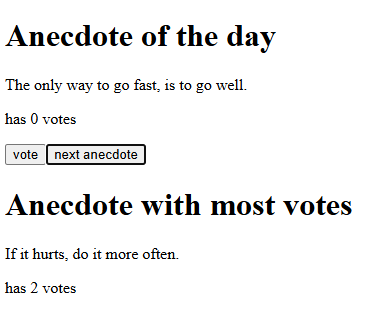
<p><img src="/assets/images/image3.png" alt="Image" /></p>

<p>I thought I understood how states worked, but turns out, I don’t. Now, my understanding of it was simply “any element that refreshes its data on the page due to user interaction should use state”. But I realised that I didn’t need to use state for the most votes calculation (and display).</p>

<figure class="highlight"><pre><code class="language-jsx" data-lang="jsx"><span class="kd">const</span> <span class="nx">App</span> <span class="o">=</span> <span class="p">()</span> <span class="o">=&gt;</span> <span class="p">{</span>
  <span class="kd">const</span> <span class="p">[</span><span class="nx">anecdotesObj</span><span class="p">,</span> <span class="nx">setAnecdotesObj</span><span class="p">]</span> <span class="o">=</span> <span class="nx">useState</span><span class="p">(</span><span class="nx">anecdotes</span><span class="p">);</span>
  <span class="kd">const</span> <span class="p">[</span><span class="nx">selected</span><span class="p">,</span> <span class="nx">setSelected</span><span class="p">]</span> <span class="o">=</span> <span class="nx">useState</span><span class="p">(</span><span class="mi">0</span><span class="p">);</span>
<span class="p">};</span>

<span class="kd">const</span> <span class="nx">Display</span> <span class="o">=</span> <span class="p">({</span><span class="nx">header</span><span class="p">,</span> <span class="nx">anecdotesObj</span><span class="p">,</span> <span class="nx">selected</span><span class="p">})</span> <span class="o">=&gt;</span> <span class="p">{</span>
  <span class="k">return</span> <span class="p">(</span>
    <span class="p">&lt;</span><span class="nt">div</span><span class="p">&gt;</span>
        <span class="p">&lt;</span><span class="nt">h1</span><span class="p">&gt;</span><span class="si">{</span><span class="nx">header</span><span class="si">}</span><span class="p">&lt;/</span><span class="nt">h1</span><span class="p">&gt;</span>
        <span class="si">{</span><span class="nx">anecdotesObj</span><span class="p">[</span><span class="nx">selected</span><span class="p">].</span><span class="nx">quote</span><span class="si">}</span>
        <span class="p">&lt;</span><span class="nt">p</span><span class="p">&gt;</span>has <span class="si">{</span><span class="nx">anecdotesObj</span><span class="p">[</span><span class="nx">selected</span><span class="p">].</span><span class="nx">votes</span><span class="si">}</span> votes<span class="p">&lt;/</span><span class="nt">p</span><span class="p">&gt;</span>
    <span class="p">&lt;/</span><span class="nt">div</span><span class="p">&gt;</span>
  <span class="p">);</span>
<span class="p">};</span>

<span class="kd">const</span> <span class="nx">MostVotes</span> <span class="o">=</span> <span class="p">(</span><span class="nx">anecdotesObj</span><span class="p">)</span> <span class="o">=&gt;</span> <span class="p">{</span>
  <span class="kd">let</span> <span class="nx">highestVote</span> <span class="o">=</span> <span class="p">{</span>
    <span class="na">index</span><span class="p">:</span> <span class="mi">0</span><span class="p">,</span>
    <span class="na">anecdote</span><span class="p">:</span> <span class="dl">""</span><span class="p">,</span>
    <span class="na">votes</span><span class="p">:</span> <span class="mi">0</span>
  <span class="p">};</span>
 
  <span class="nx">anecdotesObj</span><span class="p">.</span><span class="nx">forEach</span><span class="p">((</span><span class="nx">element</span><span class="p">,</span> <span class="nx">index</span><span class="p">)</span> <span class="o">=&gt;</span> <span class="p">{</span>
    <span class="k">if</span> <span class="p">(</span><span class="nx">highestVote</span><span class="p">.</span><span class="nx">votes</span> <span class="o">&lt;</span> <span class="nx">element</span><span class="p">.</span><span class="nx">votes</span><span class="p">)</span> <span class="p">{</span>
      <span class="nx">highestVote</span> <span class="o">=</span> <span class="nx">element</span><span class="p">;</span>
      <span class="nx">highestVote</span><span class="p">.</span><span class="nx">index</span> <span class="o">=</span> <span class="nx">index</span><span class="p">;</span>
    <span class="p">}</span>
  <span class="p">});</span>
  <span class="k">return</span> <span class="nx">highestVote</span><span class="p">.</span><span class="nx">index</span><span class="p">;</span>
<span class="p">};</span></code></pre></figure>

<p>From my primitive understanding of React, it appears that I can directly calculate the most votes because it derives its data from calculating the <code class="language-plaintext highlighter-rouge">anecdotesObj</code>. And each time a new vote is cast (and <code class="language-plaintext highlighter-rouge">setAnecdotesObj</code> is used), it will refresh <code class="language-plaintext highlighter-rouge">anecdotesObj</code>, causing React to re-render <code class="language-plaintext highlighter-rouge">App</code>, re-calling the <code class="language-plaintext highlighter-rouge">MostVotes</code> function.</p>

<p>Also, I had no idea that in Javascript, primitive types are copied by value, while objects (including arrays and functions) are copied by reference. So it’s like… C? Except with support for objects, and much more, of course.</p>

<h3 id="off-topic-ish-ramble">Off-topic-ish Ramble</h3>
<p>Those marathon length tutorial videos, turns out, are actually really useful and are the best thing ever! All this time I’ve been fumbling in the dark when all I needed was the foundational knowledge of computer science subjects, these videos and some documentation and I’d no longer be perpetually confused!</p>

<p>The people who yell “go build projects instead of following tutorials” are wrong. I tried doing that for years and would only get confused in my own search. Missing missing reasons is a massive obstacle for someone who doesn’t even understand the basics of x framework, library or language. People seem to forget that.</p>

<p>Or perhaps… I’m just too bad at this? I don’t think so.</p>

<p><br /></p>

<table>
  <tbody>
    <tr>
      <td><a href="../../../2026/06/27/beginning-react.html">Previous Post</a></td>
      <td><a href="../../../2026/07/07/useful-javascript.html">Next Post</a></td>
    </tr>
  </tbody>
</table>]]></content><author><name></name></author><summary type="html"><![CDATA[Today I finished part 1 of FSO.]]></summary></entry><entry><title type="html">Beginning React: What</title><link href="/2026/06/27/beginning-react.html" rel="alternate" type="text/html" title="Beginning React: What" /><published>2026-06-27T00:00:00+00:00</published><updated>2026-06-27T00:00:00+00:00</updated><id>/2026/06/27/beginning-react</id><content type="html" xml:base="/2026/06/27/beginning-react.html"><![CDATA[<p>I have decided to quit CS50W and begin Full Stack Open instead. In my eyes it appears much more well rounded than CS50W as it covers RESTful, containers and more. It has all of the things that I wanted to delve into after CS50W. So, why not just drop CS50W and start this one now?</p>

<h3 id="figuring-how-react-works-the-what">Figuring how React works (The ‘what’)</h3>
<p>React is so difficult to wrap my mind around. But in general, I feel this way towards any incredibly high level language. Tutorials simply tell you “when you declare/write … etc etc, you MUST do this.” But why?</p>

<p>There are many more new things to follow when working with something like React. For example:</p>

<figure class="highlight"><pre><code class="language-jsx" data-lang="jsx"><span class="kd">function</span> <span class="nx">ChatMessage</span><span class="p">(</span><span class="nx">props</span><span class="p">)</span> <span class="p">{</span>
  <span class="k">return</span> <span class="p">(</span>
    <span class="p">&lt;</span><span class="nt">div</span><span class="p">&gt;</span>
      <span class="si">{</span><span class="nx">props</span><span class="p">.</span><span class="nx">message</span><span class="si">}</span>
      <span class="p">&lt;</span><span class="nt">img</span> <span class="na">src</span><span class="p">=</span><span class="s">"media/user.png"</span> <span class="na">width</span><span class="p">=</span><span class="s">"50px"</span><span class="p">/&gt;</span>
    <span class="p">&lt;/</span><span class="nt">div</span><span class="p">&gt;</span>
  <span class="p">)</span>
<span class="p">}</span>

<span class="kd">const</span> <span class="nx">App</span> <span class="o">=</span> <span class="p">(</span>
  <span class="p">&lt;&gt;</span>
  <span class="p">&lt;</span><span class="nc">ChatInput</span> <span class="p">/&gt;</span>
  <span class="p">&lt;</span><span class="nc">ChatMessage</span> <span class="na">message</span><span class="p">=</span><span class="s">"hello"</span> <span class="p">/&gt;</span>
  <span class="p">&lt;/&gt;</span></code></pre></figure>

<p>In C, props in the function argument would be illegal, as the <code class="language-plaintext highlighter-rouge">ChatMessage</code> function call in <code class="language-plaintext highlighter-rouge">App</code> does not explicitly pass any variables/arguments into the function. Heck, the fact that there’s a <code class="language-plaintext highlighter-rouge">const</code> variable containing what looks like HTML that is also able to call other functions in the file is incomprehensible to me.</p>

<p>The answer is that JSX is syntax that gets translated into javascript by Babel afterwards. What is:</p>

<figure class="highlight"><pre><code class="language-jsx" data-lang="jsx"><span class="p">&lt;</span><span class="nc">ChatMessage</span> <span class="na">message</span><span class="p">=</span><span class="s">"hello"</span> <span class="p">/&gt;</span></code></pre></figure>

<p>is translated into:</p>

<figure class="highlight"><pre><code class="language-jsx" data-lang="jsx"><span class="nx">React</span><span class="p">.</span><span class="nx">createElement</span><span class="p">(</span><span class="nx">ChatMessage</span><span class="p">,</span> <span class="p">{</span> <span class="na">message</span><span class="p">:</span> <span class="dl">"</span><span class="s2">hello</span><span class="dl">"</span> <span class="p">})</span></code></pre></figure>

<p>Which made me think… And realise that the way Babel works is not so foreign after all! In CS50W project 1, creating your own markdown to HTML translator with regex is an optional challenge. Babel follows the same principle. Apparently, Babel is what is called a source-to-source translator (aka transpiler). Though Babel’s own website calls itself a compiler. Is it a transpiler or compiler? <a href="https://stackoverflow.com/questions/43968748/is-babel-a-compiler-or-transpiler">Stackoverflow users say that they’re both</a>.</p>

<h3 id="other-notes">Other notes</h3>
<p>In any case, my arduous journey of learning Reacts syntax and their huge library officially begins…</p>

<div class="language-plaintext highlighter-rouge"><div class="highlight"><pre class="highlight"><code>Guard Operator (&amp;&amp;)
Const result = value1 &amp;&amp; value2;
If value1 is true, the result will be value2. This works like an if-statement.
</code></pre></div></div>

<p>This is some Javascript syntax that’s useful to remember. I can use this for inserting if-statements directly in the JSX that renders HTML components. Like so:</p>

<figure class="highlight"><pre><code class="language-jsx" data-lang="jsx"><span class="k">return</span> <span class="p">(</span>
  <span class="p">&lt;</span><span class="nt">div</span><span class="p">&gt;</span>
    <span class="si">{</span><span class="nx">sender</span> <span class="o">===</span> <span class="dl">'</span><span class="s1">robot</span><span class="dl">'</span> <span class="o">&amp;&amp;</span> <span class="p">&lt;</span><span class="nt">img</span> <span class="na">src</span><span class="p">=</span><span class="s">"media/robot.png"</span> <span class="na">width</span><span class="p">=</span><span class="s">"50"</span><span class="p">/&gt;</span><span class="si">}</span>
    <span class="si">{</span><span class="nx">message</span><span class="si">}</span>
    <span class="si">{</span><span class="nx">sender</span> <span class="o">===</span> <span class="dl">'</span><span class="s1">user</span><span class="dl">'</span> <span class="o">&amp;&amp;</span> <span class="p">&lt;</span><span class="nt">img</span> <span class="na">src</span><span class="p">=</span><span class="s">"media/user.png"</span> <span class="na">width</span><span class="p">=</span><span class="s">"50"</span><span class="p">/&gt;</span><span class="si">}</span>
  <span class="p">&lt;/</span><span class="nt">div</span><span class="p">&gt;</span>
<span class="p">)</span></code></pre></figure>

<p>Note to self: I really need to properly look into arrow functions and what’s the deal with them.</p>

<p><br /></p>

<table>
  <tbody>
    <tr>
      <td><a href="../../../2026/06/24/not-google.html">Previous Post</a></td>
      <td><a href="../../../2026/07/01/react-states.html">Next Post</a></td>
    </tr>
  </tbody>
</table>]]></content><author><name></name></author><summary type="html"><![CDATA[I have decided to quit CS50W and begin Full Stack Open instead. In my eyes it appears much more well rounded than CS50W as it covers RESTful, containers and more. It has all of the things that I wanted to delve into after CS50W. So, why not just drop CS50W and start this one now?]]></summary></entry><entry><title type="html">NotGoogle Search Clone</title><link href="/2026/06/24/not-google.html" rel="alternate" type="text/html" title="NotGoogle Search Clone" /><published>2026-06-24T00:00:00+00:00</published><updated>2026-06-24T00:00:00+00:00</updated><id>/2026/06/24/not-google</id><content type="html" xml:base="/2026/06/24/not-google.html"><![CDATA[<p>Today I worked on my ‘NotGoogle’ search clone.</p>

<p><img src="/assets/images/image1.png" alt="Image" /></p>

<p>When I first tried to emulate the ‘I’m Feeling Lucky’ Search button, I used a hidden input field like so:
<code class="language-plaintext highlighter-rouge">&lt;input type="hidden" name="btnI" value="I'm+Feeling+Lucky"&gt;</code>
But I quickly realised it turns the regular Google Search button into an ‘I’m Feeling Lucky’ one too.</p>

<p>So I tried manually creating the logic for button click behaviour with some Javascript.</p>

<figure class="highlight"><pre><code class="language-javascript" data-lang="javascript"><span class="o">&lt;</span><span class="nx">script</span><span class="o">&gt;</span>
    <span class="kd">const</span> <span class="nx">SEARCH_ENDPOINT</span> <span class="o">=</span> <span class="dl">'</span><span class="s1">https://www.google.com/search</span><span class="dl">'</span><span class="p">;</span>


    <span class="kd">let</span> <span class="nx">luckyButton</span> <span class="o">=</span> <span class="nb">document</span><span class="p">.</span><span class="nx">getElementById</span><span class="p">(</span><span class="dl">"</span><span class="s2">luckyButton</span><span class="dl">"</span><span class="p">);</span>
    <span class="kd">let</span> <span class="nx">regButton</span> <span class="o">=</span> <span class="nb">document</span><span class="p">.</span><span class="nx">getElementById</span><span class="p">(</span><span class="dl">"</span><span class="s2">regButton</span><span class="dl">"</span><span class="p">);</span>


    <span class="c1">//Listen for button click event</span>
    <span class="nx">regButton</span><span class="p">.</span><span class="nx">addEventListener</span><span class="p">(</span><span class="dl">"</span><span class="s2">click</span><span class="dl">"</span><span class="p">,</span> <span class="p">()</span> <span class="o">=&gt;</span> <span class="nx">search</span><span class="p">(</span><span class="dl">"</span><span class="s2">reg</span><span class="dl">"</span><span class="p">));</span>
    <span class="nx">luckyButton</span><span class="p">.</span><span class="nx">addEventListener</span><span class="p">(</span><span class="dl">"</span><span class="s2">click</span><span class="dl">"</span><span class="p">,</span> <span class="p">()</span> <span class="o">=&gt;</span> <span class="nx">search</span><span class="p">(</span><span class="dl">"</span><span class="s2">lucky</span><span class="dl">"</span><span class="p">));</span>


    <span class="kd">function</span> <span class="nx">search</span><span class="p">(</span><span class="nx">type</span><span class="p">)</span> <span class="p">{</span>
        <span class="kd">let</span> <span class="nx">q</span> <span class="o">=</span> <span class="nb">document</span><span class="p">.</span><span class="nx">getElementById</span><span class="p">(</span><span class="dl">"</span><span class="s2">inputBox</span><span class="dl">"</span><span class="p">).</span><span class="nx">value</span><span class="p">;</span> <span class="c1">// search query by user</span>


        <span class="c1">// only search when the input box has a value</span>
        <span class="k">if</span> <span class="p">(</span><span class="nx">q</span><span class="p">)</span> <span class="p">{</span>
            <span class="kd">const</span> <span class="nx">url</span> <span class="o">=</span> <span class="k">new</span> <span class="nx">URL</span><span class="p">(</span><span class="nx">SEARCH_ENDPOINT</span><span class="p">);</span>
            <span class="nx">url</span><span class="p">.</span><span class="nx">searchParams</span><span class="p">.</span><span class="kd">set</span><span class="p">(</span><span class="dl">'</span><span class="s1">q</span><span class="dl">'</span><span class="p">,</span> <span class="nx">q</span><span class="p">);</span>


            <span class="c1">// if user clicked the lucky button instead</span>
            <span class="k">if</span> <span class="p">(</span><span class="nx">type</span> <span class="o">===</span> <span class="dl">"</span><span class="s2">lucky</span><span class="dl">"</span><span class="p">)</span> <span class="p">{</span>
                <span class="nx">url</span><span class="p">.</span><span class="nx">searchParams</span><span class="p">.</span><span class="nx">append</span><span class="p">(</span><span class="dl">'</span><span class="s1">btnI</span><span class="dl">'</span><span class="p">,</span> <span class="dl">'</span><span class="s1">I</span><span class="se">\'</span><span class="s1">m Feeling Lucky</span><span class="dl">'</span><span class="p">);</span>
            <span class="p">}</span>
            <span class="nb">window</span><span class="p">.</span><span class="nx">location</span><span class="p">.</span><span class="nx">href</span> <span class="o">=</span> <span class="nx">url</span><span class="p">.</span><span class="nx">toString</span><span class="p">();</span>
        <span class="p">}</span>
    <span class="p">}</span>
<span class="o">&lt;</span><span class="sr">/script&gt;</span></code></pre></figure>

<p>Interestingly enough, I noticed that the final line that sends the user to the new URL does not fire properly as long as the input form has the <code class="language-plaintext highlighter-rouge">&lt;form&gt;</code> tags in place. What would happen was that the javascript script fires first, and then the form (with no action parameter filled) redirects the user back to the home page, so nothing happens for the user. I created my own race condition.</p>

<p>Removing <code class="language-plaintext highlighter-rouge">type="submit"</code> didn’t work on the search buttons, because turns out, <code class="language-plaintext highlighter-rouge">type="submit"</code> is the default behaviour for buttons in the first place.</p>

<p>Though finally… I realised that all of that was incredibly unnecessary, I could have just used the name and value attributes to tack on parameters to the lucky search button itself..</p>

<figure class="highlight"><pre><code class="language-html" data-lang="html"><span class="nt">&lt;form</span> <span class="na">action=</span><span class="s">"https://www.google.com/search"</span><span class="nt">&gt;</span>
    <span class="nt">&lt;div</span> <span class="na">class=</span><span class="s">"row justify-content-center"</span> <span class="na">style=</span><span class="s">"padding-bottom: 1rem;"</span><span class="nt">&gt;</span>
        <span class="nt">&lt;div</span> <span class="na">class=</span><span class="s">"col-auto"</span><span class="nt">&gt;</span>
            <span class="nt">&lt;img</span> <span class="na">src=</span><span class="s">"media/logo.png"</span><span class="nt">&gt;</span>
        <span class="nt">&lt;/div&gt;</span>
    <span class="nt">&lt;/div&gt;</span>


    <span class="nt">&lt;div</span> <span class="na">class=</span><span class="s">"row justify-content-center"</span> <span class="na">style=</span><span class="s">"padding-bottom: 1rem;"</span><span class="nt">&gt;</span>
        <span class="nt">&lt;div</span> <span class="na">class=</span><span class="s">"col-md-4"</span><span class="nt">&gt;</span>
                <span class="nt">&lt;input</span> <span class="na">id=</span><span class="s">"inputBox"</span> <span class="na">type=</span><span class="s">"text"</span> <span class="na">name=</span><span class="s">"q"</span> <span class="na">autocomplete=</span><span class="s">"off"</span> <span class="na">class=</span><span class="s">"form-control"</span><span class="nt">&gt;</span>
        <span class="nt">&lt;/div&gt;</span>
    <span class="nt">&lt;/div&gt;</span>


    <span class="nt">&lt;div</span> <span class="na">class=</span><span class="s">"row justify-content-center"</span><span class="nt">&gt;</span>
        <span class="nt">&lt;div</span> <span class="na">class=</span><span class="s">"col-auto"</span><span class="nt">&gt;</span>
            <span class="nt">&lt;button</span> <span class="na">type=</span><span class="s">"submit"</span> <span class="na">class=</span><span class="s">"btn btn-light"</span><span class="nt">&gt;</span>Google Search<span class="nt">&lt;/button&gt;</span>


        <span class="nt">&lt;/div&gt;</span>
        <span class="nt">&lt;div</span> <span class="na">class=</span><span class="s">"col-auto"</span><span class="nt">&gt;</span>
            <span class="nt">&lt;button</span> <span class="na">type=</span><span class="s">"submit"</span> <span class="na">name=</span><span class="s">"btnI"</span> <span class="na">value=</span><span class="s">"I'm Feeling Lucky"</span> <span class="na">class=</span><span class="s">"btn btn-light"</span><span class="nt">&gt;</span>I'm Feeling Lucky<span class="nt">&lt;/button&gt;</span>
        <span class="nt">&lt;/div&gt;</span>
    <span class="nt">&lt;/div&gt;</span>
<span class="nt">&lt;/form&gt;</span></code></pre></figure>

<p>Buttons in forms are both a part of form control and form submission data. Text field input name value pairs are always included during submission, but for buttons, they are only submitted when the specific button is used to submit the form.</p>

<p>This is a much better solution than the first idea of using a hidden text input field to tack on the search parameters. I feel pretty silly for not realising this at first. Oh well!</p>

<p><br /></p>

<table>
  <tbody>
    <tr>
      <td>Previous Post</td>
      <td><a href="../../../2026/06/27/beginning-react.html">Next Post</a></td>
    </tr>
  </tbody>
</table>]]></content><author><name></name></author><summary type="html"><![CDATA[Today I worked on my ‘NotGoogle’ search clone.]]></summary></entry></feed>